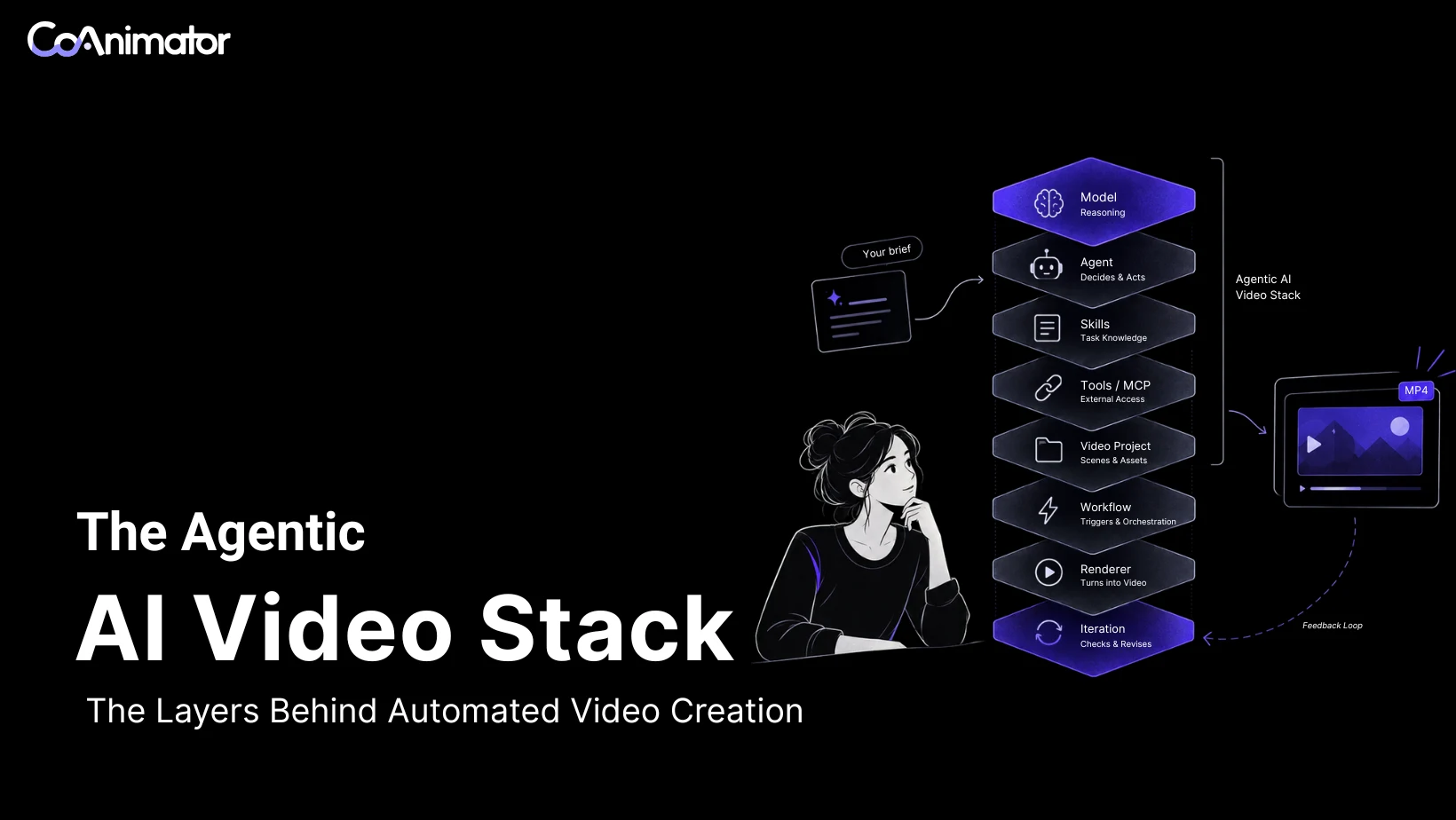
Video made with AI agents now comes from parts a team can name, swap, and test one at a time. A team can change the model without touching the project, add a skill without touching the renderer, or schedule the whole chain without changing the agent.
The label “agentic AI video” currently covers a chatbot drafting scripts, a prompt box returning one clip, and a system editing project files and checking its own render. The three have different ceilings, and a product page rarely says which layers it includes. A team unable to see the layers cannot tell why a video came out wrong or which part to fix.
Two of the layers, skills and MCP, are starting to converge, and a ten-minute test shows which layers a given tool includes.
A stack is a chain of layers
Suppose a support software company called Handoff ships round-robin assignment for its shared inbox and wants a 30-second announcement video. The material is a screen recording of a ticket arriving and being assigned, a logo, and a short note from the product manager. Everything from the first line of narration to the final MP4 passes through the same chain of layers.
A stack is the sequence of parts a request travels through, each adding one kind of capability. The table is a practical map, not a formal industry classification, and its third column shows how the Handoff video could go wrong at each layer.
| Layer | Job | A failure in the Handoff video |
|---|---|---|
| Model | Interprets the brief and writes the words | Narration says tickets go to the least busy rep, while the recording shows a fixed rotation |
| Agent | Reads files, makes edits, runs commands | The fix comes back as a chat reply and nobody edits the project |
| Skill | Teaches the rules of one tool or format | The agent guesses a render command that does not exist |
| MCP or tool | Reaches systems outside the agent | Competitor wording comes from stale memory instead of a live lookup |
| Project | Stores scenes, timing, and narration as editable parts | A renamed label inside the recording means recording again |
| Renderer | Converts the project into frames and an MP4 | A render without its narration replaces the approved file |
| Feedback loop | Lets the agent see its own result | A caption covers the Assign button and nobody notices |
| Workflow | Starts the chain on a schedule or an event | The video goes stale after the next release |

Each failure has a different fix, which is the main reason to separate the layers. A stronger model does nothing for a caption covering a button, and a better renderer does nothing for a narration line describing the wrong behavior. The chain starts with the model, the layer that does the thinking.
The model reasons but cannot act
The model is the language model behind everything else. It reads the brief, settles what each scene says, writes the narration, and weighs whether an edit improves the result. A large language model such as Claude, GPT, or Gemini fills this role. Clip-generation models are a different kind. They return finished footage instead of an editable project, so they sit in the tool layer as something the agent calls.
On its own, a model call is one input and one output. A model can write a strong opening line and still be unable to open a project file, inspect scene two, or run a command.
Consider the Handoff brief. The product manager’s note says tickets go to “the next available rep.” The recording shows each new ticket moving to the following teammate in a fixed order. A model given the note alone could describe Handoff as assigning tickets by workload, which sounds plausible and is wrong.
A stronger model reads context more carefully and writes tighter narration, but it cannot make a brief true or see a result it never receives. Acting on a project and receiving its results takes the agent.
The agent turns reasoning into actions
Anthropic’s engineering guide on building effective agents separates two designs. Workflows run models and tools through code paths written in advance. Agents are systems where language models “dynamically direct their own processes and tool usage.” The line explains why a chatbot drafting scripts and a system building a project can be sold under one word.
In video work, the AI video agent is often a coding agent such as Claude Code or Codex, because the job means reading and writing files and running commands. A bare chat assistant hands back text for a person to apply, while a coding agent applies the change itself and reports what happened. Not every agent needs a vendor command-line tool. In CoAnimator, some connections, such as ChatGPT and Grok, run the studio’s own agent, while others, such as Claude Code, reuse the tools a person has installed.
In the Handoff example, the agent opens the project, finds the narration for scene three, and compares it with the recording. It notices the rotation and corrects the line. When the note and the recording still disagree, it asks the person directing it which behavior the video should describe.
Agents differ in how much they decide without asking, from approving the scene plan first to reviewing the first cut. A capable agent still arrives without the rules of the specific tool it has been handed, and skills close the gap.
Skills hold the rules of the job
A skill is a folder containing a SKILL.md file with a name, a description, and instructions for one task, and it can bundle scripts and reference material. Agents load skills in three steps, according to the Agent Skills format. They read each name and description at startup, load the full instructions when a task matches, and run bundled files when the instructions call for them.
Anthropic announced Skills on 16 October 2025 and, by 18 December 2025, had published them as an open standard for cross-platform portability. The format now runs in Claude Code, Codex, Gemini CLI, and many other agent products.
CoAnimator’s documentation describes its agent skill in similar terms. The skill teaches an agent the commands and project conventions of the studio. Installing it does not install the coa command, an agent runtime, or an account connection. It goes into each agent’s own skills folder, under ~/.claude/skills/coa-cli/ for Claude Code and ~/.agents/skills/coa-cli/ for Codex CLI, and the agent needs a new session to pick it up.
Return to Handoff. An agent without the skill might invent a render command or write a timeline file in the wrong shape. With the skill loaded, it uses the real command and follows the project’s conventions.
A skill carries know-how. Facts from outside the agent, and actions in other systems, come through a different layer.
MCP and plugins connect the agent to outside systems
The Model Context Protocol (MCP) standardizes how AI assistants connect to the systems holding data and tools. Anthropic announced it on 25 November 2024. On 9 December 2025, it contributed the protocol to the Agentic AI Foundation, a foundation hosted by the Linux Foundation, alongside Block’s goose and OpenAI’s AGENTS.md. An MCP server is a running service an agent calls for a lookup or an action, such as research, a design file, or an analytics query.
Because agents, skills, and MCP servers all extend what a video agent can do, the terms are easy to blur, though they solve different halves of the problem. A skill supplies know-how, such as the conventions of a template’s scenes, and fails when the instructions are missing or out of date. An MCP server supplies data or actions, such as competitor and channel research, and fails when the connection is down, unauthorized, or untrusted.
CoAnimator’s research plugin sits on the MCP side. It handles YouTube and competitor research through MCP360, and the route needs the supported Claude Code and MCP environment. Media models and voice engines reach the agent through plugins too, with providers such as ElevenLabs for narration and music and Grok Imagine for images and video. Each provider bills the person’s own account.
Suppose the Handoff team wants the opening line to reflect how rival helpdesk tools describe automatic assignment today. With a research connection in place, the agent pulls current examples. Without it, the agent falls back on the model’s memory of competitor marketing, which may be months or years old.
Skills and connections shape what the agent does in one turn. The work itself needs somewhere to live between turns.
The project keeps the video as parts
Before a render, the video is a project holding scenes, timing, narration, and pointers to assets. CoAnimator’s documentation says the whole video lives as plain files on disk, covering the animation, the timeline, and the narration. The files can sit in the same git repository as the product, so a product change becomes a pull request instead of a reshoot. A single .coa file can carry the whole project.
An exported MP4 remembers nothing about the decisions behind it, so changing one line of narration in a finished file means starting over. In a project, the same change is an edit to one element.
Handoff shows the limits. A later release renames “Round robin” to “Rotation.” The narration and the caption are text in the project, so the agent edits both and re-renders. The old label also appears inside the screen recording, and recorded pixels stay pixels, so fixing them takes a new recording or an overlay. Editability covers the parts the project holds separately, and the team should know which parts those are before the first change request arrives.
Editable files still need something to turn them into video. The renderer does this work, and its consistency decides whether an approved video can be reproduced next month.
The renderer draws every frame
The renderer converts a finished timeline into frames, then encodes the frames as a video file. It does no reasoning, and its value is repeatability.
CoAnimator’s developer documentation describes each frame as a function of the timeline clock, so any moment can be rendered on demand and a run can be repeated. The desktop app and the coa command-line tool share one export pipeline. Headless output, rendered without the app window, should match what was approved on the stage, the studio’s live preview, at the same settings. Before replacing an existing file, the coa tool runs export checks on dimensions, frame count, frame rate, duration, and expected audio. A failed or cancelled export leaves the existing file in place, and the command exits with code 1 on failure.
For Handoff, suppose a scheduled run loses the narration track. The expected-audio check turns the loss into a failure. The approved file stays where it was, and a deploy step respecting the exit code does not publish a silent video.
Encoded files can differ across engines, hardware, and platforms, so the documentation does not promise byte-identical output. FFmpeg and FFprobe are required, and a headless Linux machine needs a display server (a virtual screen), with xvfb-run shown in the examples. The current release has no hosted render service, so a local machine or an automated build (CI) runner does the work.
A script can verify a render’s files and audio. Judging the picture takes the feedback loop, which is what separates an agentic system from an automated one.
The feedback loop makes the stack agentic
Without the loop, the stack still produces video, once, from one plan. The loop is what lets a result change the next decision.
CoAnimator’s page on agentic video editing describes the cycle as read, edit, render, look, and edit again. It puts the stakes in one line, “An agent that cannot see its output is guessing.” The studio’s stage reloads each edit before the agent’s next turn. The agent inspects what it rendered, and a person directing the work can watch each edit land on the stage.

In Handoff, the caption for scene three lands exactly when the cursor clicks Assign, and the caption box covers the button. No script, plan, or file check reveals this, because every file is valid. After the stage reloads, the agent or the reviewer sees the covered button, moves the caption, and checks the sequence again.
Evidence comes in kinds. File checks find missing assets and wrong durations, a rendered frame shows overlap and cropping, and listening exposes a clipped word or music burying speech. Watching the whole sequence reveals pacing, which a single screenshot cannot. The question for any tool is which of these kinds of evidence its agent can reach.
Anthropic’s guide also describes an evaluator-optimizer pattern, where one model call generates and another evaluates. For video, the evaluator needs the real frames and audio, because an evaluator shown a script will approve a script.
The loop works inside a single run. Something outside the agent still has to start the run, and it can do so with nobody at the keyboard.
The workflow decides when it runs
Anthropic’s definition covers any predefined code path, and the stack uses the narrower sense of a route set in advance and wrapped around the agent. A workflow decides whether and when the agent runs, and the agent decides what to do once it starts. A scheduled job with a single agent step in the middle is legitimate and often more predictable, though it is a different claim from an agent running the whole job.
For video, a workflow is a trigger. A scheduled job, a CI job, or a release workflow starts the chain. CoAnimator’s weekly changelog video page shows one version. The agent reads merged pull requests and the list of commits since the last release tag. It writes the week’s scenes into the template project used for earlier episodes, then renders headlessly. The run stops at render and notify, and publishing stays a human click by default.
For Handoff, the trigger could be a pull request. When a release changes the interface, the same pull request edits the project and CI renders the new version. The video can stay current without anyone remembering to ask.
The two designs combine well when the workflow handles timing and the agent handles judgment inside it. With all eight layers in view, one product’s version of the chain shows which layers the vendor supplies and which stay with the team.
CoAnimator splits the layers between studio and team
CoAnimator is a studio where an AI agent works on a video project stored as files, while a stage updates live. Rendering runs locally on macOS, Windows, and Linux, through the app or the coa command. Plugins add narration, sound effects, music, image generation, website capture, publishing, and research. The person connects an agent they already use, and the studio supplies the skill, the project format, the stage, and the renderer.
Model and agent usage follows the connection the person selects. The skill, project, stage, and renderer belong to the studio. The workflow belongs to the team, since the scheduled job or CI job lives in their own pipeline. A team can also assemble the same chain itself from a coding agent, a rendering library, FFmpeg, and skills of its own. The do-it-yourself route gives full control but leaves the team owning the project format, the render checks, and the loop.
The layers also show up in finished work. Rege’s post on X shows cinematic product demos built in CoAnimator with a 3D mockup skill.
Loading post from X…
A finished example hides the corrections behind it, so a revision made on a team’s own material is the better comparison. Skills and MCP have also seen recent protocol changes, and their current status is worth checking before choosing a tool.
Skills and MCP are converging
Late 2025 moved two of the layers toward each other. Skills became an open format in December 2025, and MCP moved under a neutral foundation the same month. The current MCP specification revision is dated 2026-07-28 and defines optional extensions for long-running tasks, interface elements such as video players, and skills.
The Skills over MCP extension lets a server ship skills together with its tools, so a service could teach an agent how to use it through the same connection. Its proposal is marked Final, while the MCP documentation says SDK and host support is still being implemented. Until support lands, the practical question for a buyer is where a tool’s skill lives and how it updates, since a stale skill produces confident mistakes.
Each added layer also adds a way to fail, and the failures cluster in a few predictable places.
Where the stack breaks
An error at the model or in the brief carries into the narration, the captions, and the closing line, so fixing the most visible sentence leaves the rest. Checking the interpretation before detailed production saves more work than polishing a mistaken first draft.
More layers mean more places where untrusted text enters. The MCP specification tells hosts to treat descriptions of tool behavior as untrusted unless they come from a trusted server. The skills extension tells hosts to treat skill content as untrusted input. A skill or plugin from outside carries the same kind of risk as any dependency, so the first install deserves a look at what it asks to run.
Local rendering does not settle where data is processed. Plugins generating, capturing, researching, or publishing may upload inputs, and the connected agent reads the brief and the files it opens. Where source material must stay in one environment, examine every service in the chain.
Setup is real work, including the Claude Code requirement on the MCP research route and the provider keys the plugins need. A loop also needs a stopping rule. Each pass costs model usage and a person’s review time, and a request to keep improving the video gives the agent no reason to stop. The cost of the chain is why not every video needs all of it.
When fewer layers are enough
Not every video needs the whole chain. A clip that repeats with a new name or date each time fits a template and a scheduled job, which needs a workflow and a renderer and no agent. A one-off social clip nobody will revise can come from a one-shot generator at lower effort. A cut that hinges on a judgment taking longer to explain than to perform is often quicker for a skilled human editor.
The full stack pays off in the opposite case. The video will change, the source is real material such as a product interface, and someone will ask for a revision next month. The cost of the extra layers is then spread across every later change. Telling the two cases apart takes one real revision on real material, not a feature list.
One edit request tests the whole stack in ten minutes
Use a video the team already approved, with its real assets. Ask for a change crossing several layers and requiring the agent to leave the rest alone.
Change the narration in scene three to say tickets rotate through the team in a fixed order. Keep scenes one, two, and four exactly as approved. Re-render, then tell me what changed and what you checked.
Then read the result against the stack. Did the agent open the project and edit it, or return text for someone else to apply? Did it use the tool’s real commands, which shows whether a skill is working? Did scene three change while the others stayed untouched, which shows how the project stores parts? Did the render pass validation before replacing the approved file? Did the agent say what it looked at, a frame, a transcript, or nothing beyond the file list? Can the same request run from a script without anyone at the keyboard?
Two further checks matter. Ask which layers come from the vendor and which from the team’s own accounts and pipelines, and what happens to the approved video when a layer fails halfway through. The answers show which parts of the stack come with the product and which the team must supply.
Questions about the agentic AI video stack
Teams comparing agentic video tools tend to ask about the same few boundaries, such as generator versus stack, skill versus MCP, and agent versus workflow.
Is the agentic video stack the same as an AI video generator?
No. A generator is usually one layer, a model with an interface around it. An agentic AI video generator adds an agent, an editable project, and a loop, and a generated clip can still be one input to such a project.
What is the difference between an agent skill and an MCP server?
A skill is written guidance an agent loads when a task matches, and an MCP server is a live connection to data or actions beyond the agent.
What is the difference between an AI agent and a workflow?
A workflow follows steps written in advance, and an agent decides its own steps while it works.
Which layer should a team evaluate first?
The project and the feedback loop. They decide how much each later change costs and whether mistakes get caught before export. The model and agent can be swapped later, and a project format is much harder to leave.
Details such as supported agents and plugins change often, so a tool’s own documentation settles them on the day of purchase.
Review becomes the scarce step
As agents start more videos on release triggers, rendering stops being the bottleneck. The harder question is who looks at the result before it ships, since an unattended run can finish every check and still put a covered button in front of customers. Tools reporting what the agent inspected, and stopping at a notification instead of publishing, will be easier to trust with the step.
Teams already working with a coding agent can see where the review step sits on a real project through video as code, where the whole video lives as project files.