
Yes. Claude Code can make videos when you give it a video environment it can actually control.
Claude Code is not a text-to-video model that generates a finished clip inside the model itself. It is an agent that can understand a project, edit files, analyze images, run commands, and iterate on its work. Anthropic describes Claude Code as an agentic coding tool that can read a codebase, edit files, execute commands, and work across multiple tools.
That turns out to be a useful model for video production.
Instead of asking Claude Code to synthesize every pixel, you give it a video project it can edit. It can write scenes, change animation timing, work with screenshots and recordings, revise narration, run the renderer, inspect the result, and keep iterating.
That is the idea behind Claude Code + CoAnimator.
CoAnimator gives Claude Code the part that is normally missing: a visual animation studio, timeline, live stage, templates, media handling, and a local video renderer. Claude Code handles the agentic work. CoAnimator turns that work into the video you see and export. CoAnimator’s project files remain editable, and changes made by the agent can hot-reload onto the stage while you work.
The result feels less like prompting an AI video generator and more like directing an AI editor.
The quick answer
If you ask Claude Code by itself to “make me a product launch video,” it still needs some software capable of drawing frames and encoding them into a video.
Give Claude Code access to CoAnimator, however, and the workflow changes.
You can describe the video in normal language. Claude Code can work inside the CoAnimator project, build and modify the animation, use the project’s template and skill instructions, and run the local renderer when the project is ready. CoAnimator provides a coa command-line renderer specifically for this workflow.
So there are really two answers:
| Question | Answer |
|---|---|
| Can Claude Code natively generate video pixels by itself? | No |
| Can Claude Code build and render a complete video using CoAnimator? | Yes |
| Can it edit scenes after the first version? | Yes |
| Can it work from screenshots and other images? | Yes |
| Can it run the render command? | Yes |
| Can you preview the result visually while it works? | CoAnimator provides the live stage and editor |
| Can the finished video render locally? | Yes, CoAnimator renders MP4 on your machine |
That distinction matters. Claude Code does not need to become a video editor. It needs a video system whose files and commands it can understand.
Why Claude Code is surprisingly well suited to video
Most video editors were designed around mouse input. You open a timeline, drag something three pixels to the left, trim a clip, open another panel, change a setting, preview it, then repeat.
Coding agents work differently. Their natural loop is closer to:
Understand → edit → run → inspect → revise
That is already how Claude Code works with software projects. It can understand a task in plain language, make coordinated changes across files, execute commands, and continue from the result.
A video can fit into the same loop if the animation is represented as something the agent can edit.
Instead of:
Move this title manually until it feels right.
You can say:
Bring the headline in half a second earlier, reduce the scale animation, and keep it on screen until the dashboard appears.
Instead of rebuilding a scene yourself, you describe the change. The agent handles the implementation.
That is the more interesting part of using Claude Code for video. It is not simply generating animation code once. It can participate in the entire iteration loop.
What CoAnimator adds to Claude Code
Open a CoAnimator project and you are not staring at a terminal pretending to be a video editor.
You have an actual studio.
There is a media panel for your footage and assets, a stage where you can see the video, a timeline underneath it, audio tracks, playback controls, export controls, and an agent workspace alongside the project.
That separation is useful. Claude Code does not have to reproduce everything a visual editor already does well. It can stay focused on interpreting instructions and changing the project, while CoAnimator remains the place where you watch and judge the result.
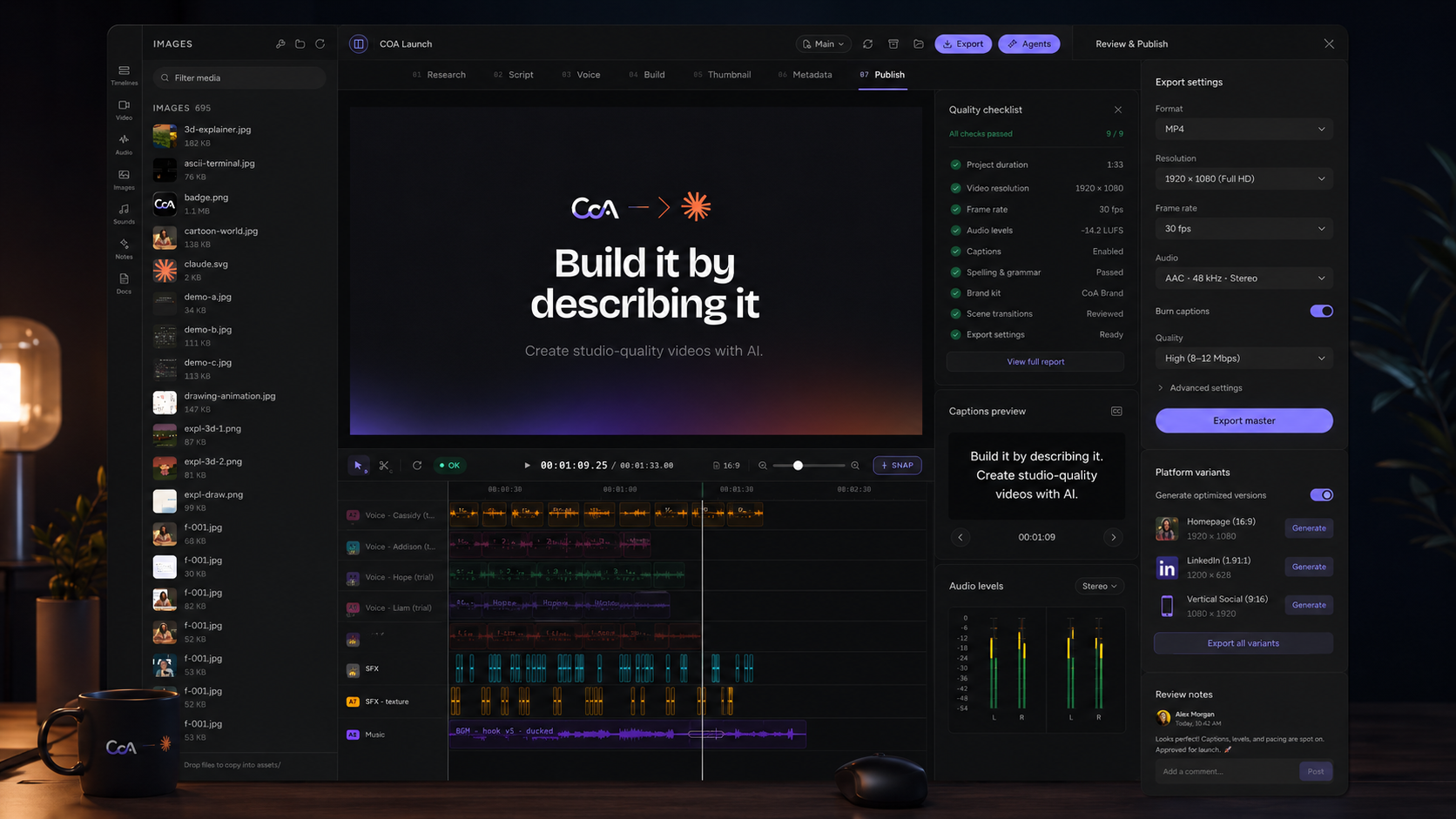
CoAnimator describes this architecture directly: the agent edits ordinary project files and the editor hot-reloads those edits onto the stage.
You can therefore work in two modes at the same time. Tell Claude Code what you want. Then look at the stage and decide whether you actually like it.
That last part still matters.
Read more about the studio in Introducing CoAnimator: the agentic animation studio that builds your videos.
From one prompt to a real video
Imagine you are launching a SaaS feature and need a 45-second product video.
You create a new CoAnimator project and start with the Product Demo template.
Then you give Claude Code a brief such as:
Create a 45-second launch video for Acme Analytics. Start with the problem of teams manually combining reports from different tools. Then introduce the unified dashboard, show the integrations connecting, move into the live analytics view, highlight automatic anomaly detection, and finish with “See what changed before your next meeting.” Keep the visual style clean and restrained. Use our screenshots as the primary product visuals. Avoid generic AI imagery.
That is not a request for a single AI-generated clip. It is a production brief.
Claude Code can reason about the structure, work inside the project, and start turning that direction into scenes.
The stage gives you something important that a terminal cannot: visual feedback.
Maybe the opening feels slow. Maybe the dashboard enters too late. Maybe the title is technically correct but visually dominates the product.
You can see that immediately and respond:
The first scene is too static. Cut two seconds from the opening, bring the first dashboard screenshot in sooner, and reveal the three integration cards one after another instead of showing them together.
The agent edits the project. The stage updates. You review it again.
That is the workflow.
You do not have to start from a blank timeline
One of the harder problems with agent-generated creative work is giving the agent enough context. “Make this look good” is not much of a specification. A working example is much more useful.
CoAnimator templates are designed around that idea. A template contains a working project plus an agent skill that explains how that particular format is structured, timed, and styled. Rather than asking Claude Code to guess how a certain animation system works, the template gives it conventions and examples to follow.
In the current CoAnimator project picker, you can start from formats such as:
- Product Demo
- Studio Effects
- Map Animation
- Motion Graphics
- Talking Head Tutorial
- Drawing Animation
- Scene Explainer
That changes the first prompt considerably. For a product video, start from Product Demo. For kinetic typography and animated UI, Motion Graphics gives the agent a closer starting point. If you already have someone speaking on camera, Talking Head Tutorial or the footage effects workflow can build around the recording rather than replacing it. If the story is geographical, Map Animation gives the project the right visual grammar before the agent writes the first scene.
The template is not the finished video. It is context for the agent.
CoAnimator’s templates also remain editable. Colors, pacing, motion, layout, and other decisions can be changed instead of locking the project into a fixed preset.
Claude Code can work with your actual product visuals
Product videos quickly fall apart when the AI does not understand the interface it is supposed to explain.
Claude Code can analyze images directly. Anthropic currently supports adding screenshots through drag and drop, clipboard paste, or a local image path, and Claude Code can use those images as visual context.
That means your brief can include the actual interface rather than a text description of it. You can give it:
- A dashboard screenshot
- A settings screen
- A mobile view
- A chart
- A pricing page
- A reference frame for the visual treatment
Then give concrete direction:
The first screenshot is the current dashboard. Make it the focus of scene three. Crop toward the analytics panel when the narration mentions revenue, then pull back before the next scene. Do not redraw the interface.
That is much more useful than asking an AI model to imagine what your product probably looks like.
For software companies especially, this is one of the strongest reasons to use an agentic animation workflow. The real product remains the visual source of truth.
Claude Code can also trigger the render
This is where the workflow goes beyond “Claude writes some animation code.”
Claude Code can execute commands in a project. CoAnimator ships a command-line tool called coa that can render the same project without requiring a separate export system. CoAnimator states that the CLI uses the same rendering pipeline as the editor and can produce MP4 output locally.
So once the project is ready, Claude Code can invoke the renderer rather than stopping at the project files.
For example:
coa render launch-video.coa --out launch.mp4Technically, CoAnimator is encoding the frames. Operationally, Claude Code can run the command.
That is why saying “Claude Code cannot render videos” misses what agentic software actually does. Claude Code does not need a built-in H.264 encoder any more than it needs to contain its own compiler to build software. It needs access to the right tool and the ability to operate it.
The editor and the agent each have a different job
The cleanest way to understand the relationship is this:
| Claude Code | CoAnimator |
|---|---|
| Understands your brief | Displays the video |
| Plans and revises scenes | Provides the stage |
| Edits project files | Provides the timeline |
| Analyzes screenshots | Handles media in the project |
| Adjusts animation logic | Plays animation in context |
| Revises narration | Places and plays audio |
| Runs project commands | Renders the actual frames |
| Can trigger the export | Produces the MP4 |
Neither side needs to pretend to be the other. And you remain in the middle, deciding whether the result actually communicates what you intended.
A better way to iterate on video
The first version will rarely be the final version. That is normal.
What changes with an editable agent-driven workflow is the cost of the second version.
Suppose your 45-second video is nearly finished, but three things bother you:
- The opening headline stays too long.
- The screen recording is difficult to read.
- The CTA arrives before the final narration has landed.
In a traditional editor, you locate each part of the timeline and make the changes manually.
With Claude Code, the feedback itself can become the edit:
Shorten the opening title by 12 frames. Zoom the dashboard to 115 percent during the workflow section so the table remains readable. Delay the CTA until the final narration line has finished, then hold it for two seconds.
Claude Code can work out which parts of the project need changing. You review the result on the stage and continue.
This is where the “agentic” part becomes more meaningful than simply adding an AI prompt box to a video editor. The agent has a project it can continue working on.
What about voiceover?
Narration has to affect the edit, not sit on top of it.
If the voiceover takes seven seconds and the scene disappears after four, the video is wrong even if both pieces are individually correct.
CoAnimator includes a TTS voiceover plugin that generates narration into the project and places it on the timeline as audio. The animation can then be timed around the voice track, and lines can be regenerated as the script changes.
That creates a useful loop for Claude Code:
- Write the narration.
- Build the scenes around it.
- Watch the result.
- Shorten a line.
- Retiming follows.
Instead of treating the script, animation, and audio as separate jobs, they remain parts of the same project.
What if you already have footage?
Claude Code video workflows are not limited to animations built from scratch.
CoAnimator can also work around real footage. Its current workflow supports effects, captions, overlays, camera moves, and other treatments applied to video you already recorded.
That makes a different kind of prompt possible:
Use this screen recording as the base. Keep the footage intact. Add a subtle zoom when the user opens Analytics, highlight the Revenue card while it is being discussed, add captions underneath the interface, and fade everything except the CTA during the last three seconds.
You supply the footage. The project adds the direction around it.
This is particularly useful for product tutorials and launch videos because the core demonstration can remain real.
For a full workflow from brief to render, see How to make a product demo video with AI, step by step.
Why editable video projects matter
A generated clip is an output. An editable video project is an asset.
That difference becomes obvious the first time something changes:
- Your navigation moves.
- The pricing screen gets redesigned.
- A metric changes.
- Marketing wants a vertical version.
- The CTA changes three days before launch.
If the video is represented as an editable project, the agent can modify the affected part instead of recreating the entire idea.
CoAnimator stores videos as project files that can be reviewed and committed alongside other project assets. Its CLI is also designed for headless rendering and CI workflows.
For a software company that ships every week, that is more interesting than generating one impressive clip. It means video can start behaving more like a maintainable part of the product launch process.
Claude Code + CoAnimator vs prompt-to-video generation
These approaches solve different problems.
A generative video model is useful when you want the model to invent footage. Ask for a cinematic city, an astronaut walking across a desert, or a surreal transition, and synthesis is the point.
A product demo has a different requirement:
- The dashboard needs to be your dashboard.
- The copy has to be correct.
- The cursor needs to point at the right control.
- The brand colors cannot drift between shots.
- A pricing update should not require recreating the entire film.
That is where an agent-driven editable project becomes useful. You are asking AI to operate a production system, not merely imagine a sequence of pixels.
Generative video can still be one ingredient inside that system when you need it. It does not need to become the entire workflow.
Claude Code, CoAnimator, and Remotion are not the same thing
Claude Code can also write animations using frameworks such as Remotion or other code-based graphics systems. That is a perfectly valid workflow if you are comfortable building and maintaining the video stack yourself.
CoAnimator targets a different layer. Its developer documentation describes it as a desktop studio where agents author videos on a visual timeline, while local rendering and agent-oriented project conventions are already part of the product.
So the decision is less about whether Claude Code is capable of writing animation code. It is.
The question is how much of the production environment you want to assemble yourself.
If you want to build a custom rendering stack, Claude Code plus a framework gives you that flexibility. If you want Claude Code working inside an environment that already has a stage, timeline, media workflow, templates, skills, and renderer, that is the problem CoAnimator is designed to solve.
The role of agent skills
Giving an agent access to files does not automatically mean it understands them. It still needs conventions.
CoAnimator solves this through skills. The desktop app can install the CoAnimator skill for Claude Code, and template projects can provide their own instructions so the agent knows the relevant project layout, timing rules, presets, and style conventions.
This matters because there is a significant difference between:
Here is a random animation project. Figure it out.
And:
Here is the animation project, the format rules, a finished example, and instructions for how this style is supposed to behave.
The second produces a much more useful agent. It also means a template can represent more than visual styling. It can encode a way of making a particular kind of video.
A practical Claude Code video workflow
For most projects, the workflow can stay surprisingly simple:
- Create a CoAnimator project. Start blank or choose a template close to the video you want to make.
- Give Claude Code the brief. Explain the audience, objective, duration, product, tone, CTA, and any constraints that matter.
- Add real assets. Bring in product screenshots, screen recordings, footage, logos, audio, or visual references.
- Let the agent build the first cut. Claude Code works inside the project while CoAnimator displays the result on the stage.
- Direct the edit in plain language. Comment on what you actually see: pacing, hierarchy, timing, camera movement, text density, transitions, and audio.
- Render the final project. Export in the studio or let Claude Code call the
coarenderer when the project is ready.
The valuable part is not that there are fewer buttons. It is that your direction can become the interface.
How to prompt Claude Code for better videos
Avoid prompts like:
Make this video amazing.
There is not enough information in that instruction to make meaningful editorial decisions. Treat Claude Code more like an editor receiving a creative brief.
A better prompt specifies what the audience should understand, what material has to appear, what should happen in each part of the story, how long the video should be, and what should be avoided.
For example:
Build a 30-second homepage product demo from the three dashboard screenshots in the assets folder. The viewer should understand within the first eight seconds that Acme replaces manual weekly reporting. Start with the reporting problem, transition into the dashboard, then show report generation and the final share screen. Use the interface itself as the main visual. Keep text to one short sentence per scene. Avoid decorative 3D objects, fake UI, exaggerated transitions, or generic AI imagery. End on the product with “Build your first report in minutes.”
Now the agent has something it can direct toward.
After the first cut, your prompts should become even more specific. “Make it better” is vague. “The dashboard disappears before I can understand it. Hold the screen for another second and move the callout closer to the Revenue card” is actionable.
Good AI video direction still requires taste. The agent simply makes executing that taste faster.
Can this be automated?
Yes.
Because CoAnimator exposes a command-line renderer and its projects can live as ordinary files, rendering does not have to be limited to a manual export from the desktop application. The same local rendering pipeline can run headlessly, including in scripted or CI environments.
That opens up workflows that are difficult with conventional video editors:
- A product team could update screenshots and regenerate a demo.
- A changelog workflow could produce a new release video.
- A marketing repository could keep the video project next to the product assets it depends on.
You probably do not need that level of automation for your first video. But it changes what becomes possible once video is represented as a project an agent can edit and a machine can render.
When this workflow makes sense
Claude Code and CoAnimator are a strong fit when precision and editability matter:
- Product demos
- Launch videos
- Tutorials
- Motion graphics
- Explainers
- Recurring release videos
- Footage that needs captions or visual treatment
It is less appropriate when your entire objective is to synthesize photorealistic cinematic footage from imagination. That is primarily a generative video problem.
There will also be projects where a professional animator should make the creative decisions directly. Agentic editing does not remove the need for judgment, visual hierarchy, pacing, storytelling, or taste. It changes who has to perform every mechanical step between the idea and the finished frame.
For a cost comparison against agencies, freelancers, and AI-assisted tools, see How much does a product demo video cost?.
FAQ
Can Claude Code make videos?
Yes, when it is connected to a video tool or rendering system. Claude Code can edit files and run commands, while software such as CoAnimator provides the visual stage, timeline, animation runtime, and MP4 renderer.
Can Claude Code create a video from one prompt?
With a prepared CoAnimator project or template, a single brief can be enough to start building a video. The agent can create and revise scenes inside the project, but serious production usually benefits from reviewing the first version and giving additional direction.
Does Claude Code render the MP4?
Claude Code does not contain its own video encoder, but it can run external commands. CoAnimator provides a coa CLI that renders CoAnimator projects to MP4, which means Claude Code can trigger the rendering process from the project.
Can Claude Code understand screenshots?
Yes. Claude Code supports image input and can analyze screenshots, UI designs, diagrams, and other images supplied through the conversation or a local path.
Do I need to know how to code?
Not necessarily. CoAnimator is designed so you can describe the video in plain language while the agent handles the underlying project changes. The files remain accessible if you do want direct control.
Can I use Claude Code for product demo videos?
Yes. Product demos are particularly suited to this workflow because Claude Code can work from real screenshots and recordings while CoAnimator provides the animation, timeline, preview, and renderer.
Can Claude Code edit an existing recording?
The useful distinction is between editing the binary file itself and editing a project built around that footage. In CoAnimator, your real recording can be placed into the project and combined with captions, overlays, effects, camera movement, and other treatments.
Can Claude Code add voiceover?
Claude Code can write and revise narration. CoAnimator also provides a built-in TTS voiceover plugin that generates narration into the project and places it on the timeline, allowing scenes to be timed around the audio.
Where does CoAnimator render the video?
CoAnimator currently renders locally on your machine and produces MP4 output. Its developer documentation also describes headless local rendering through the coa CLI.
Does CoAnimator charge per render?
CoAnimator states that local exports are unlimited and do not use per-export credits.
Can I use another coding agent instead?
Yes. CoAnimator currently documents support for agents including Claude Code, Codex, Cursor, and Gemini CLI, with templates and skills designed to give agents the context needed to work with the project.
Claude Code changes the interface to video production
The interesting question is no longer whether Claude Code contains a video generator. It does not need one.
Claude Code already knows how to understand instructions, work across files, analyze visual references, run tools, and iterate. CoAnimator gives that agent a video project it can operate, a stage where you can see the work, and a renderer that turns the finished timeline into an MP4.
You describe the result. The agent builds and revises the project. You watch it take shape. Then the studio renders it.
For teams already comfortable telling Claude Code how software should behave, making a video starts to feel surprisingly familiar. The project is different, but the interaction model is the same: describe, inspect, change, render.