Lifetime deal👉 DON’T MISS OUT. Limited time launch deal ends in

Alternatives · VEED

A VEED alternative for videos of your product

VEED fills a feed: generated clips, subtitles, translation, avatars, all priced per editor. CoAnimator builds the video around your own interface, renders it on your machine, and costs the same whoever opens it.

macOS · Windows · Linux · no credits, no render limits

the split

What each one is

VEED is built for the feed: generate a clip, subtitle it, brand it, translate it, post it. CoAnimator is built for the product: your interface on screen, explained, rendered on your own machine.

The social platform

VEED

A browser platform that generates video, voices, avatars and images from a prompt, and edits what you upload: automatic subtitles in 100+ languages, translation into 50+, brand kits, eye-contact correction and noise removal.

What it needs
A prompt or an upload. Projects and media live in a VEED workspace.
What you get
An exported video, subtitled and branded, and a project in their workspace.
What you pay
A free plan with a watermark, then Creator, Pro and Studio priced per editor and billed in your local currency. Credits, translation minutes and AI voice hours are metered, and unused credits do not carry over.

The studio

CoAnimator

The agentic animation studio. Your own agent builds narrated product videos out of your screens, your assets and your script. Demos, launches and tutorials, on a timeline you can open and change.

What it needs
A paragraph describing the video. Screen recordings if you have them.
What you get
A project of editable files on your disk, and an MP4 rendered on your machine.
What you pay
Free forever at 720p with a watermark. $99 once for 4K and clean exports, covering two devices. No credits, no seats renewing every month.

your interface is the subject

The thing you built,
explained on screen.

The agent builds scenes around your product: the UI assembling, a line of type landing on the beat, narration timed to the motion. It is the same material a social tool would ask you to upload, except here it is what the whole project is made of.

Download free

feature comparison

CoAnimator vs VEED, feature by feature

VEEDCoAnimator
What each one is for
Generating footage from a promptYes.Video, voices, avatars and images, generated to your brandYes.Generated shots, images and voices from a prompt, on your own keys and rendered locally. Not generated to a stored brand kit
Subtitles from speechYes.Auto subtitles are 10 min/mo on Free and Unlimited* from Creator up, in 100+ languages. Subtitle styles stay limited below ProPartial.Captions from a take’s audio with word-level timing, and from your script when the scene is built rather than filmed. No 100-language subtitle catalogue
Avatars, lip sync and voice cloningYes.All three, plus eye-contact correction and noise removalPartial.Talking-head avatars with lip sync, rendered locally and never drawn from a credit pool. Voice runs on your own TTS keys. No eye-contact correction or noise removal
What runs out
AI creditsNo.6,000 on Creator, 30,000 on Pro, 180,000 on Studio, which their cards translate to roughly 1,500, 7,500 and 45,000 AI videosYes.None. You bring the agent you already pay for
Unused creditsNo.Their FAQ says the allowance arrives monthly or yearly with your billing cycle, refreshes on renewal, and does not carry overYes.Nothing to carry over, so nothing to lose
What the credits buyPartial.Text to speech, dubbing and subtitle translation all draw on the same pool: TTS runs 4 hours a year on Creator to 960 on Studio, dubbing try-once below Pro then 6 and 12 hoursYes.The voiceover plugin runs on your own keys, timed to the timeline, and the agent will write and voice the script in another language. No dubbing over an existing take
What it costs, and what the bill multiplies by
Free tierYes.A real free plan: watermarked 720p, videos up to 10 minutes, 2 GB of storage, 10 minutes of auto subtitles a monthYes.The whole studio, unlimited 720p renders, forever
How the bill scalesNo.Per editor, charged on invite, pending invitations included. Their table caps editors at three on Free, Creator and Pro, and five on StudioPartial.One licence covers two devices. Extra device slots are $29 once each
What it costsPartial.Priced in local currency, so the figure depends where you are. Read in an Indian session: Creator ₹520 a user a month, billed yearly as ₹6,238; Pro ₹1,068; Studio ₹1,722Yes.$0, or $99 once for 4K and clean exports
Export qualityPartial.720p on Free, 1080p on Creator, 4K from Pro up. Free also caps a video at 10 minutesPartial.Free renders stop at 720p. 4K needs the $99 licence, then runs on your own hardware
Moving someone offPartial.Removing an editor credits your next charge rather than refunding itYes.Free. Remove a device and the slot is available straight away
What you own afterwardsNo.The exported video. The project and its media stay in a VEED workspace in their cloudYes.Scenes, media and a timeline as ordinary files on your own disk

the workflow

What making a video looks like in CoAnimator

  1. 01

    Brief it

    A paragraph in plain language: what the video shows, who it’s for, the tone. No prompt to tune, and no workspace to invite anyone into.

  2. 02

    The agent writes the scenes

    Your agent (Claude Code, Codex, Gemini, OpenClaw, or ours) writes scenes onto the templates, pulling in your screens and assets where they belong.

  3. 03

    Narration lands timed

    The TTS plugin reads the script and places every line on the timeline where it belongs, so animation beats and voice move together.

  4. 04

    Review on the stage

    Timeline, media panel, live stage. Steer with feedback like “slow the intro” or “swap that screenshot”, and watch it hot-reload.

  5. 05

    Render locally

    In-app or headless through the coa CLI. Your machine, your disk, and no per-seat line for the people who open it after you.

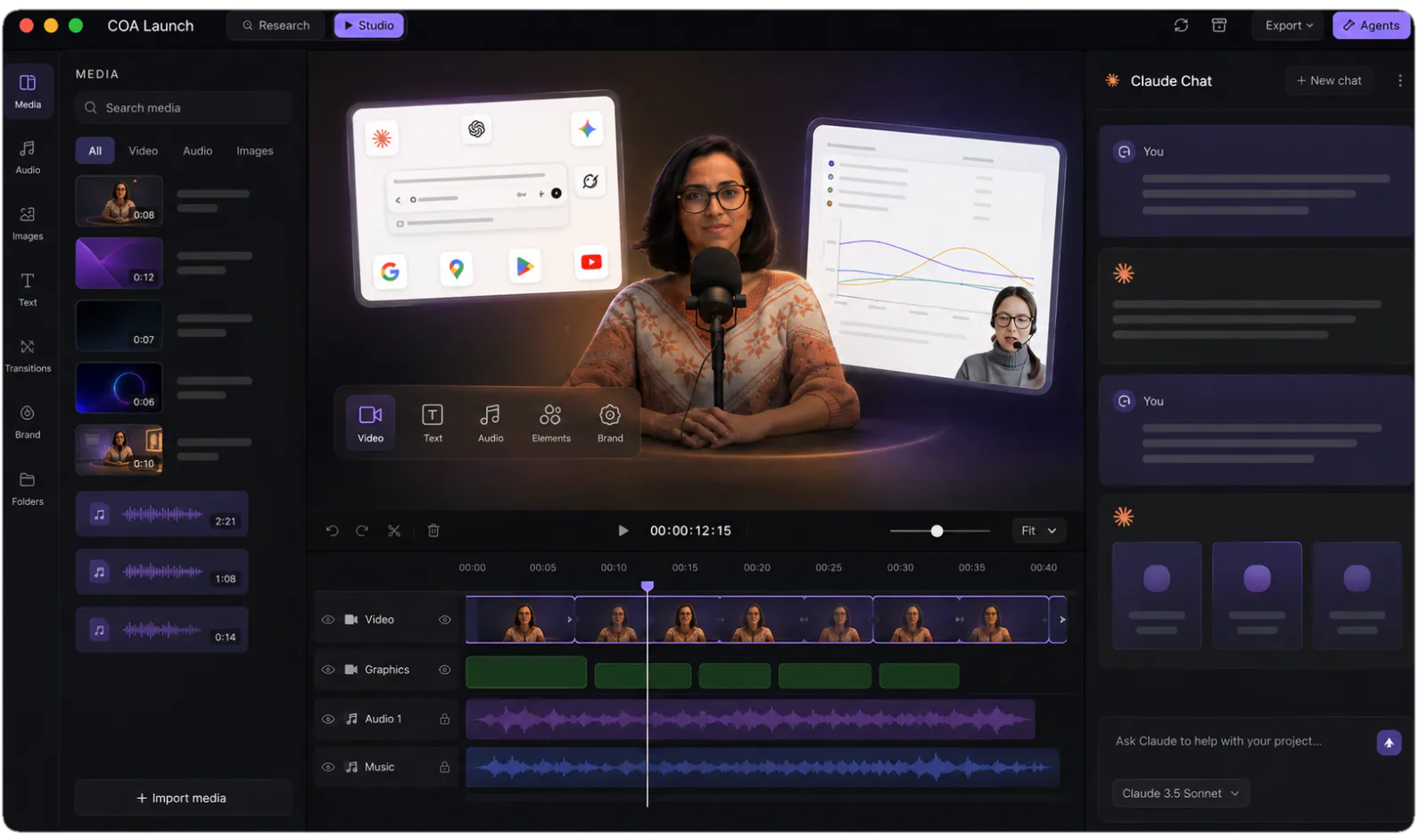
The CoAnimator studio: media library, stage and timeline with an agent chat alongside
The studio you are steering: stage, timeline and your agent, side by side.

pricing comparison

What the bill looks like on each route

The VEED route, subscribed

The free planWatermarked 720p, 10-minute videos, 2 GB storage$0
Creator, Pro or StudioPriced in your local currencyper editor
A fourth editorFree, Creator and Pro cap the workspace at threeneeds Studio
When you invite someoneCharged on invite, pending invitations includedbilled then
AI credits6,000 Creator, 30,000 Pro, 180,000 Studiometered
Credits you did not spendTheir FAQ: credits do not carry overexpired
Translation and dubbingTranslation spends credits. Dubbing is 6 hr/yr on Pro, 12 on Studiometered
Trying a paid plan firstTrial is enterprise only, minimum 3 usersno trial
Year oneThe plan price, times everyone who opens it

The CoAnimator route, installed

The free tierThe whole studio, unlimited 720p renders, watermarkedâś“ free
The licenceOne price, and it covers two devices$99 once
Every person who opens itA device slot, bought once, not every month$29 once
Moving someone offFree. Remove a device and the slot frees up at onceno renewal
AI creditsNone. Your own agent, on your own keysno credits
Anything you did not useThere is no balance to expirenothing
Translation and dubbingThe agent writes and voices the script in another language. No dubbing over a takeincluded
Trying it firstFree forever, and it is the whole studioâś“ free
Year one$0, or $99 once

everything included · one licence later unlocks 4K · no credits, no meters

made with coanimator

Videos shipped from the studio

Both are videos of real products doing real things, built end to end in CoAnimator: script, scenes, voiceover and render.

MCP360: full product demo
MCP360: full product demoWatch on YouTube ↗Ten scenes, a ten-part voiceover, sound effects and a music bed. The whole 81-second demo, rendered locally.
Copilot SDK v2.5: feature demoView on X ↗
the showcaseEvery finished video, start to renderEach one with what it took to make →

FAQ

Is CoAnimator a good VEED alternative?

For product videos, yes. For social video, no. VEED generates clips from a prompt, subtitles them automatically in more than a hundred languages, translates into over fifty, applies a brand kit, and fixes eye contact and background noise on a talking head. That is a feed factory and CoAnimator is not one. CoAnimator is a desktop studio where your own coding agent builds a video around your actual interface: scenes, titles, spotlights and narration over your screens, rendered on your machine and left as editable files.

What does VEED cost?

That depends where you are. VEED prices in local currency, so the number on their pricing page changes by market. What does not change is the shape: a free plan with a watermark, then Creator, Pro and Studio, each charged per editor. Their help centre is explicit: you are charged for each user invited or added to the workspace, pending invitations included, and their own example is two people in one workspace paying twice the monthly plan. Free, Creator and Pro also cap the workspace at three editors, so the fourth person means moving to Studio. CoAnimator is $0, or $99 once for 4K and clean exports, covering two devices, with extra device slots at $29 once.

What runs out on VEED?

Credits, mostly, and their full feature table is where the numbers are. The plans carry 6,000 on Creator, 30,000 on Pro and 180,000 on Studio, which their cards translate to roughly 1,500, 7,500 and 45,000 AI videos. Their FAQ says the allowance comes “each month or year” depending on your billing cycle, refreshes when the subscription renews, and does not carry over. Generation, subtitle translation and text to speech all draw on that pool, and text to speech is capped on top of it at 4 hours a year on Creator, 144 on Pro and 960 on Studio. AI dubbing has its own ceiling: try-once below Pro, then 6 hours a year and 12. Auto subtitles are the generous part, unlimited from Creator up. CoAnimator meters none of it, because rendering happens on your own hardware.

How do the free plans compare?

Both are real. VEED’s free plan gives watermarked 720p exports, videos up to ten minutes, 2 GB of storage and ten minutes of auto subtitles a month, and their FAQ says the watermark sits in the corner of videos made on it. CoAnimator’s free tier is the whole studio with unlimited local renders at 720p, also watermarked. The difference is what sits behind the paywall: on VEED it is the watermark plus credits, minutes and seats, and on CoAnimator it is a one-off $99 for 4K and clean exports, after which nothing is counted.

Can I try a paid VEED plan first?

Their FAQ offers a trial to enterprise customers, and says you need a minimum of three users to set one up. For everyone else the free plan is the trial. CoAnimator’s free tier is not time-limited: every template, every look and unlimited renders at 720p, for as long as you want.

What does CoAnimator not have that VEED does?

Generative video from a prompt, automatic subtitles from speech in 100+ languages, translation and dubbing in 50+, AI avatars and lip sync, voice cloning, eye-contact correction, noise removal, a stock catalogue, brand kits and social templates. It also runs with nothing installed. If those are the features you are shopping for, buy VEED.

What happens to the video after it is made?

In CoAnimator the video stays a project of ordinary files: scenes, media and a timeline on your own disk. When the product changes you swap the clip that went stale and re-render, and the rest comes through untouched. Rendering is one command through the coa CLI, so a release script can re-render every video you own, and the whole project lives in git alongside the code it documents.

One app. Your agent runs it.

Install CoAnimator, point it at the agent you already pay for, and describe the video. Every project stays editable, renders on your own machine, and costs the same whoever opens it next.