Lifetime deal👉 DON’T MISS OUT. Limited time launch deal ends in

Alternatives · HyperFrames

A HyperFrames alternative with voice, templates and a licence

HyperFrames is a free open-source rendering engine. CoAnimator is the agentic animation studio: voice, templates and a licence already in the app. Keep the CLI if you want to own the engine.

macOS · Windows · Linux · no credits, no render limits

HyperFrames covers the render. CoAnimator includes voice, templates, capture and publishing.

the split

What each one is

HyperFrames is an Apache 2.0 HTML rendering engine. CoAnimator is a finished product: everything included, one price.

The engine

HyperFrames

An HTML rendering engine: compositions in, deterministic MP4s out. Agents write HTML, CSS and JS; the CLI renders them. Script, voiceover, music, editing and publishing live outside it.

Who writes it
Developers. Node 22+, FFmpeg, npx from the terminal.
What you get
The CLI, a browser Studio, and a catalog you assemble around.
What you pay
Engine is free. No credits or seat limits. Voice, music, capture and publishing are yours to wire.

The studio

CoAnimator

The agentic animation studio. Describe a product demo, launch video, or tutorial. AI agents build it scene by scene. Bring Claude Code, Codex, Antigravity or OpenClaw, or use the one that ships with the studio.

Who drives it
Anyone. A desktop app. No terminal toolchain.
What you get
Templates, timeline, TTS, music, capture and publishing. Everything included.
What you pay
Free at 720p on macOS, Windows and Linux. One-off licence for 4K. No seats.
  1. Keep HyperFrames ifYou want an engine you ownEngineFork it, embed HTML-to-video with GSAP, Lottie or Three.js, or render on Lambda.
  2. Choose CoAnimator ifYou want the studio on day oneStudioAI agents build demos, launches and tutorials from a brief. Voice and templates already in the licence.

the finished product

Download the app.
Brief the agent.

Download the app and brief the agent. Voiceover and templates are already in the licence.

Download free

feature comparison

CoAnimator vs HyperFrames, feature by feature

Both columns are scored from public docs. HyperFrames wins Apache 2.0, embedding, and Lambda. Voiceover, music, capture and publishing are wiring you add, or they are already in CoAnimator's licence.

HyperFramesCoAnimator
The engine
Video as codeYes.HTML compositions — GSAP, Lottie, Three.js, WAAPIYes.Web-platform scenes the agent authors as editable files
Open sourceYes.Apache 2.0 — fork it, embed it, ship itNo.A proprietary app with a free tier
Non-developersNo.Node 22+, FFmpeg, npx — a developer’s toolchainYes.No code, no coding setup: start from a template, change everything by chat
AI agent authoringPartial.20 open skills; agents write compositions. You still assemble voice, music, capture, publishingYes.Built for a co-animator: template skills, live stage, you redirect in real time
Git-friendly projectsYes.HTML compositions in your repoYes.Plain editable files, never baked in — change one scene weeks later and re-render
Around the engine
Script & researchNo.Outside the engine — bring a finished scriptYes.The agent researches the product and drafts the script
EditorPartial.Browser Studio previews and edits compositionsYes.Full desktop app: stage, media panel, timeline, agent chat
Multi-track timelinePartial.Tracks as data attributes in the markupYes.A timeline you drag, not markup you edit
TemplatesPartial.A catalog of blocks: transitions, overlays, captions, chartsYes.Free templates with finished sample projects and skills
Voiceover (TTS)No.Bring a service and wire itYes.ElevenLabs plugin, timed to the timeline
MusicNo.Bring your own audioYes.Soundtrack plugin composes a bed
Screen captureNo.Record elsewhere, reference the fileYes.Capture plugin records straight into the project
Rendering & shipping
Local renderYes.Deterministic MP4s via npx — freeYes.Unlimited chunk-parallel local renders — works offline
Cloud render at scaleYes.Lambda SDK and cloud rendering built inPartial.Local + CI today; cloud workers on the roadmap
Headless CI rendersYes.CLI in your pipelineYes.coa CLI; clean exit codes
Embed in your productYes.Apache 2.0 — built for exactly thisNo.Not our job: CoAnimator ships finished videos, not your app’s video feature
PublishingNo.Your pipelineYes.Publishing plugin posts to YouTube and social
Who pays what
The engineYes.Free for everyone — no seats, no thresholdsYes.Free studio at 720p; one-off licence for 4K and clean export
Credits & metersYes.None in the open-source engineYes.None anywhere — plugins run on your own API keys, at provider price
The full workflowPartial.Free too — once you wire TTS, music, capture and publishing yourselfYes.Wired on day one, in the licence

the workflow

What making a video looks like in CoAnimator

  1. 01

    Brief it

    A paragraph in plain language: what the video shows, who it’s for, the tone. No Node, no FFmpeg, no terminal.

  2. 02

    The agent writes the scenes

    Bring Claude Code, Codex, Antigravity or OpenClaw, or use the one that ships with the studio. Skip Node and FFmpeg. The agent writes scenes as files on the templates.

  3. 03

    Narration lands timed

    The TTS plugin reads the script and places every line on the timeline where it belongs, so animation beats and voice move together.

  4. 04

    Review on the stage

    Timeline, media panel, live stage. Steer with feedback — “slow the intro”, “swap that screenshot” — and watch it hot-reload.

  5. 05

    Render anywhere

    In-app or headless through the coa CLI in your release pipeline. Unlimited local renders, clean exit codes for CI.

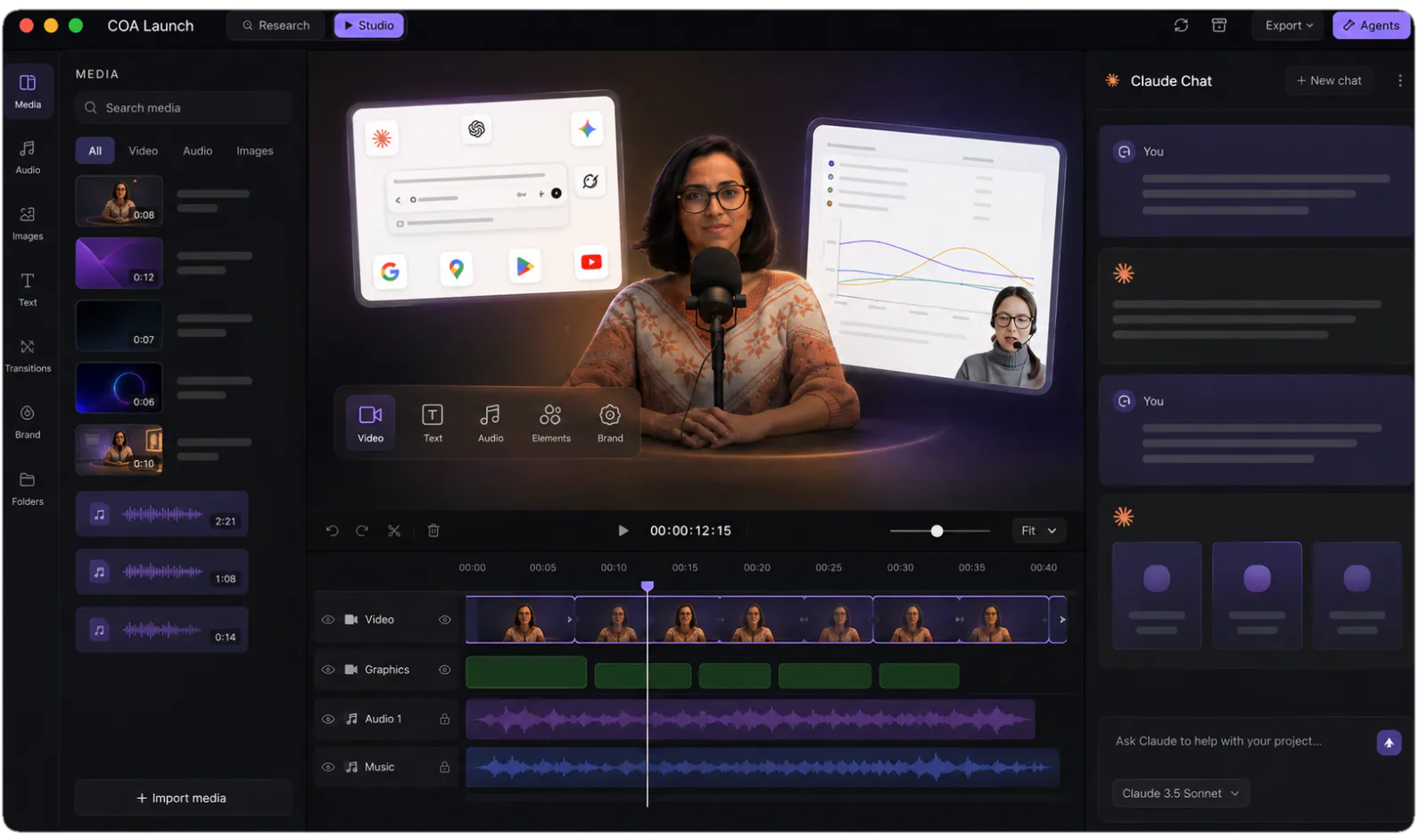
The CoAnimator studio: media library, stage and timeline with an agent chat alongside
The studio you are steering: stage, timeline and your agent, side by side.

pricing comparison

What year one costs around a free engine

The HyperFrames CLI is free. Script, voiceover, music, capture and publishing are wiring you do around it. CoAnimator prices those into the licence.

Assemble it — the HyperFrames route

The engineHyperFrames CLI — Apache 2.0, freefree
Script & conceptOutside the engine — you bring the scriptyour time
A starting pointA block catalog and compositions you writeyour time
The toolchainNode 22+, FFmpeg, npx — set up and kept workingsetup + upkeep
TimelineTracks as data attributes in the markupyour time
EditorBrowser Studio for compositions — the rest is yoursincluded
CaptionsCaption blocks in the catalog; styling is yoursyour time
TTS voiceoverPick a service, integrate, sync to the cutyour time
Music, capture, publishingYour integrations, your pipelineyour time
Year one, however many devsFree + the wiring time, per feature

Open it — the CoAnimator route

The engineWeb-platform renderer, chunk-parallel local rendersâś“ built in
Script & conceptThe agent researches the product and drafts it from your briefâś“ agent
A starting pointFree templates — sample projects and agent skills, ready to open✓ free
The toolchainA desktop app — download it and brief the agentno setup
TimelineMulti-track: video, audio, text on one clockâś“ built in
EditorThe app is the editor — stage, media panel, agent chat✓ built in
CaptionsAnimated, styled per templateâś“ included
TTS voiceoverElevenLabs plugin on your API key, timed to the timelineâś“ plugin
Music, capture, publishingSoundtrack, screen capture and publishing pluginsâś“ plugins
Year one, any team sizeWired on day one · no meters

everything included · one licence later unlocks 4K · no credits, no meters

made with coanimator

Videos shipped from the studio

Both shipped for real products and were built end to end in CoAnimator — script, scenes, voiceover and render.

MCP360: full product demo
MCP360: full product demoWatch on YouTube ↗Ten scenes, a ten-part voiceover, sound effects and a music bed — the whole 81-second demo, rendered locally.
Copilot SDK v2.5: feature demoView on X ↗
the showcaseEvery finished video, start to renderEach one with what it took to make →

FAQ

What is the difference between CoAnimator and HyperFrames?

HyperFrames is an HTML rendering engine: agents write compositions, and a CLI turns them into deterministic MP4s. Script, voiceover, editing and publishing live outside it. CoAnimator is the agentic animation studio. Describe a product demo, launch video, or tutorial; AI agents build it scene by scene. Bring Claude Code, Codex, Antigravity or OpenClaw, or use the one that ships with the studio.

Is CoAnimator a good HyperFrames alternative?

Yes, if you do not want to assemble a workflow. HyperFrames gives a developer a free engine — compositions, a browser Studio, a CLI — and leaves voiceover, music, capture and publishing to your own wiring. CoAnimator prices those into the licence.

Is HyperFrames free?

Yes. The engine, CLI, browser Studio and agent skills are Apache 2.0, with no credits, no seat limits and no company-size thresholds; commercial use is permitted. TTS voiceover, music, screen capture and publishing are your own integrations. CoAnimator is free at 720p with the full studio, and a one-off licence unlocks 4K and clean export.

Do I need to know how to code to use CoAnimator?

No. HyperFrames assumes a developer’s toolchain — Node 22+, FFmpeg, npx from the terminal. CoAnimator assumes a brief: describe the video, and the agent writes the scenes while the stage updates live. Every install ships free templates, so the first video starts from a working example.

Can both render videos headlessly from the command line?

Yes. HyperFrames renders via npx, with an AWS Lambda SDK for distributed rendering. CoAnimator ships the coa CLI, which renders any project to MP4 with presets from 720p30 to 4K60 and exits 0 or 1 for CI. CoAnimator’s renders come from studio projects with timelines, narration and templates, not standalone HTML compositions.

When is HyperFrames the better choice?

Choose HyperFrames when you want a free, open-source engine you own: embedding HTML-to-video inside your own product, forking it, or building a bespoke pipeline. CoAnimator does not compete as an embeddable engine. It ships the studio, timeline, voiceover and templates on day one.

Can I switch from HyperFrames to CoAnimator?

There’s no importer — compositions are HTML in your repo and stay there. Switching in practice means opening a CoAnimator template and briefing the agent. MP4s you’ve already rendered drop into a project as ordinary assets.

Does CoAnimator have any credit system?

No. Renders run on your machine without meters. Paid services like TTS run through plugins on your own API keys, at provider price. HyperFrames’ open-source engine is unmetered too — the difference is that CoAnimator’s voiceover, music, capture and publishing are already in the licence.

The studio is ready. Voice and templates included.

Describe the video. AI agents build it scene by scene. Templates, timeline and voiceover in the licence. Every project stays editable and renders on your machine.