Lifetime deal👉 DON’T MISS OUT. Limited time launch deal ends in

Alternatives · Steve AI

A Steve AI alternative for product videos you own

Steve AI turns a script into character animation from its own cast. CoAnimator is the agentic animation studio: your agent builds the video out of your screens and assets, renders it on your machine, and leaves you the project files.

macOS · Windows · Linux · no credits, no render limits

the split

What each one is

Steve AI turns a script into character animation using its own cast. CoAnimator is a studio where your agent builds a product video out of your own material.

The generator

Steve AI

A browser tool that turns a prompt, script, blog or audio file into animation, live-action or talking-head video, drawing on a cast that runs from 80 characters on the free plan to 300+ on Pro, over a stock library of 1 million assets rising to 15 million.

Who drives it
Their generator, from your script. Nothing to install.
What you get
A rendered video from their cast and catalogue, plus a project in their app.
What you pay
$10–40 a month billed annually ($120–480 a year); month-to-month is higher. Exports are unlimited, but AI video minutes, images, avatars and credits are metered and reset each cycle. 4K is Enterprise only.

The studio

CoAnimator

The agentic animation studio. Your own agent builds narrated product videos out of your screens, your assets and your script: demos, launches, tutorials.

Who drives it
A director with a brief, and the agent you already pay for.
What you get
A project of editable files on your disk, and an MP4 rendered on your machine.
What you pay
Free forever at 720p with a watermark. $99 once for 4K and clean exports. Nothing metered, nothing to reset.

your product, not their cast

Ask for a scene.
It uses your screens.

The agent builds scenes from the material you already have: the product UI, a screen recording, your brand. Nothing is drawn from a stock cast, so the video looks like your product rather than like a template.

Download free

feature comparison

CoAnimator vs Steve AI, feature by feature

Steve AICoAnimator
Making the video
Ready-made castYes.80 characters on Free rising to 300+ on Pro, over a library of 1 million assets rising to 15 millionPartial.Characters exist but there is no catalogue to browse: stick-figure and illustrated rigs with pose tracks and lip sync, and rigged 3D characters, all authored by the agent rather than picked off a shelf
Talking-head avatarsYes.Animated AI avatars read the script, 50 to 400 minutes a month by tierYes.Talking-head avatars with lip sync, alongside stick-figure, illustrated and 3D character rigs. Rendered on your machine, so there are no monthly avatar minutes
What runs out
Monthly metersNo.100–400 min of AI video, 800–3200 images, 120s–15 min of generative credits, and none of it rolls overYes.None. Renders are unlimited and never metered
What the free tier gives youPartial.Watermarked, and the pricing grid lists no downloadable format for FreePartial.Unlimited 720p renders with a watermark, forever
Quality and ownership
1080pPartial.From Starter, $30/mo billed annually or $60 month-to-month. Basic tops out at 720pYes.Included with the licence
4KNo.Enterprise only, at custom pricing. Paid plans top out at 2KYes.$99 once
Where it rendersNo.Their cloudYes.Your machine. Nothing uploads
What you own afterwardsPartial.An MP4 and a project inside their appYes.The project files: scenes, media and timeline on your disk

the workflow

What making a video looks like in CoAnimator

  1. 01

    Brief it

    A paragraph in plain language: what the video shows, who it’s for, the tone. No script formatting, no storyboard.

  2. 02

    The agent builds the scenes

    Your agent writes scenes onto the templates the studio ships, using your screens and assets rather than a stock cast.

  3. 03

    Narration lands timed

    The voiceover plugin reads the script part by part and places every line on the timeline where it belongs.

  4. 04

    Review on the stage

    Timeline, media panel, live stage. Steer with feedback like “slow the intro” or “swap that screenshot”, and watch it hot-reload.

  5. 05

    Render locally

    In-app or headless through the coa CLI. Unlimited renders on your own hardware, never metered.

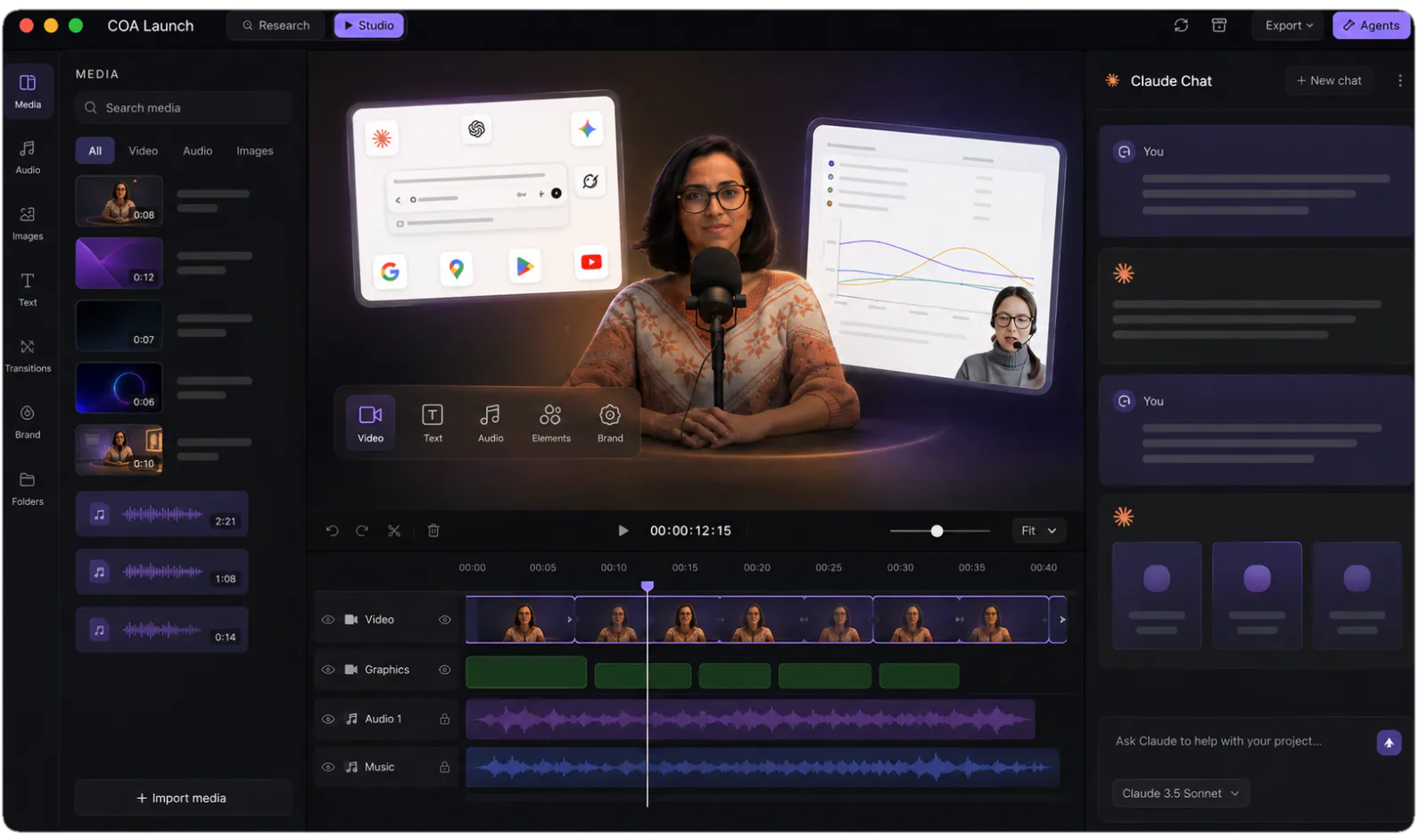
The CoAnimator studio: media library, stage and timeline with an agent chat alongside
The studio you are steering: stage, timeline and your agent, side by side.

pricing comparison

What year one looks like on each route

The Steve AI route, subscribed

The generatorBasic: 720p, 100 min of AI video a month$10 / mo
Clean 1080pStarter, or $60 if you pay month to month$30 / mo
2KPro or Generative AI, 300–400 min a month$40 / mo
4KEnterprise only, custom pricedask them
AI video minutes100 a month on Basic, up to 400 on the self-serve plansmetered
Images & stock800–3200 a month, by planmetered
AI avatars50 to 400 minutes a month, by tiermetered
Unused creditsDo not roll over. They reset every cyclegone
Year one, billed annually$120–480, and the meters reset every cycle

The CoAnimator route, installed

The studioStage, timeline, media panel, agent chat, free at 720pâś“ free
Clean 1080pIncluded with the one-off licencepay once
2KSame licence, no separate tierpay once
4K$99 once, rendered on your machinepay once
Video minutesRender as long a film as you like, as often as you likeno meter
Images & stockYour own material, plus images generated on your own keys. No catalogue to browseno meter
Narration and audioVoiceover timed to the timeline, plus sound and music generated to the briefâś“ included
Unused anythingNothing to use up, so nothing to resetno cycle
Year one$0, or $99 once

everything included · one licence later unlocks 4K · no credits, no meters

made with coanimator

Videos shipped from the studio

Both shipped for real products and were built end to end in CoAnimator: script, scenes, voiceover and render.

MCP360: full product demo
MCP360: full product demoWatch on YouTube ↗Ten scenes, a ten-part voiceover, sound effects and a music bed. The whole 81-second demo, rendered locally.
Copilot SDK v2.5: feature demoView on X ↗
the showcaseEvery finished video, start to renderEach one with what it took to make →

FAQ

Is CoAnimator a good Steve AI alternative?

Only for a particular job. Steve AI generates animation, live-action and talking-head video from a prompt or script, using its own cast of 80 characters on the free plan rising to 300+ on Pro, over a stock library of 1 million assets rising to 15 million, in a browser. If you need a script turned into character animation with nothing installed, Steve AI does it and CoAnimator does not. CoAnimator is a desktop studio where your own coding agent builds product videos on a real timeline: demos, launches, tutorials, motion graphics over your own screens.

What does Steve AI cost, and what runs out?

Read off their pricing page in August 2026, at annual billing: Basic $10 a month ($120 a year) at 720p, Starter $30 ($360) at 1080p, and both Pro and Generative AI $40 ($480) at 2K. Month-to-month is higher, at $60 for Starter. Exports themselves are unlimited on every paid plan. What runs out is upstream: 100 to 400 minutes of AI video a month, 800 to 3200 AI images and premium stock, generative credits from 120 seconds to 15 minutes, and 50 to 400 minutes of AI avatars. Steve’s own FAQ confirms unused credits do not roll over. They reset at the start of each billing cycle, on monthly and yearly plans alike.

Can I get 4K out of Steve AI?

Only on Enterprise, which is custom-priced and also where dedicated infrastructure and 6000 minutes of AI video sit. The published plans top out at 2K, including both $40-a-month tiers. CoAnimator renders 4K with the one-off $99 licence, on your own hardware, with no cap on how many times you render.

How do the free tiers compare?

Steve AI’s free plan gives 1200 seconds of AI video and 200 credits a month, watermarked, and their pricing grid lists no downloadable format for Free at all, though the homepage describes limited local downloads, so check it yourself before relying on either. CoAnimator’s free tier is unambiguous: unlimited local renders at 720p with a watermark, for as long as you like, with no cap on how many you export.

What does CoAnimator not have that Steve AI does?

A cast to browse, and a stock catalogue of its own. CoAnimator has talking-head avatars with lip sync, plus stick-figure, illustrated and 3D character rigs, but the agent authors them rather than letting you pick from 300 ready-made characters and 15 million stock assets. The trade is honest: if the video is a script acted out by a cast you choose off a shelf, Steve AI is built for that. CoAnimator is built for the video that is about your own product.

What happens to the video after it is made?

In CoAnimator the video stays a project of ordinary files on your disk: scenes, media and a timeline. When the product changes you swap the clip that went stale and re-render, and the rest comes through untouched. Rendering is one command, so a release script can re-render every video you own.

Your product, not a stock cast.

Describe the video. Your agent builds it scene by scene from your own screens and assets. Every project stays editable and renders on your machine.
