Lifetime deal👉 DON’T MISS OUT. Limited time launch deal ends in

Alternatives · Clueso

A Clueso alternative that isn’t priced by the minute

Clueso polishes the recording you made and writes the help article to match. CoAnimator builds the video itself, and the article with it: your agent, your screens, your machine, and no quota counting the minutes you ship.

macOS · Windows · Linux · no credits, no render limits

the split

What each one is

Clueso takes the recording you made and makes it presentable, then writes the help article to match. CoAnimator builds the video itself, on your machine, out of your screens and a description, and writes the article from the same project.

The polisher

Clueso

A browser tool that turns a rough screen recording into a finished video: filler words cut, script rewritten, an AI voiceover in place of your audio, auto-zooms on the action, captions on top. The same take also becomes a step-by-step article.

What it needs
A recording, a slide deck or a PDF. It uploads to their cloud before you can start.
What you get
An MP4 or GIF, an article in five formats, and a project inside their app.
What you pay
Free for one user: 10 minutes of video and 15 articles a month at 1080p, with watermark-free exports starting at Solo. Then $40/mo Solo or $120/mo Business for two users, billed yearly ($50 and $150 month to month). Priced by minutes of finished video: 15 a month on Solo, 30 on Business.

The studio

CoAnimator

The agentic animation studio. Your own agent builds narrated product videos out of your screens, your assets and your script. Demos, launches and tutorials, on a timeline you can open and change.

What it needs
A paragraph describing the video. Screen recordings if you have them.
What you get
A project of editable files on your disk, an MP4 rendered on your machine, and an article with its images from the same project.
What you pay
Free forever at 720p with a watermark. $99 once for 4K and clean exports. No minutes, no credits.

the meter

Three videos, and the month is gone

Clueso Solo · 15 minutes this month

  • Onboarding walkthrough6:20
  • Feature demo for the launch4:10
  • Bug repro for support3:05
  • Left for the rest of the month1:25
A fourth video waits for the renewal, or you buy an add-on. Re-exporting one you already made is free. A new video is new minutes.

CoAnimator · nothing to spend

  • Onboarding walkthrough
  • Feature demo for the launch
  • Bug repro for support
  • The fourth, and every re-cut on Friday
Rendering runs on your own machine, so there is no quota to divide between the videos you need and the versions you are still trying.
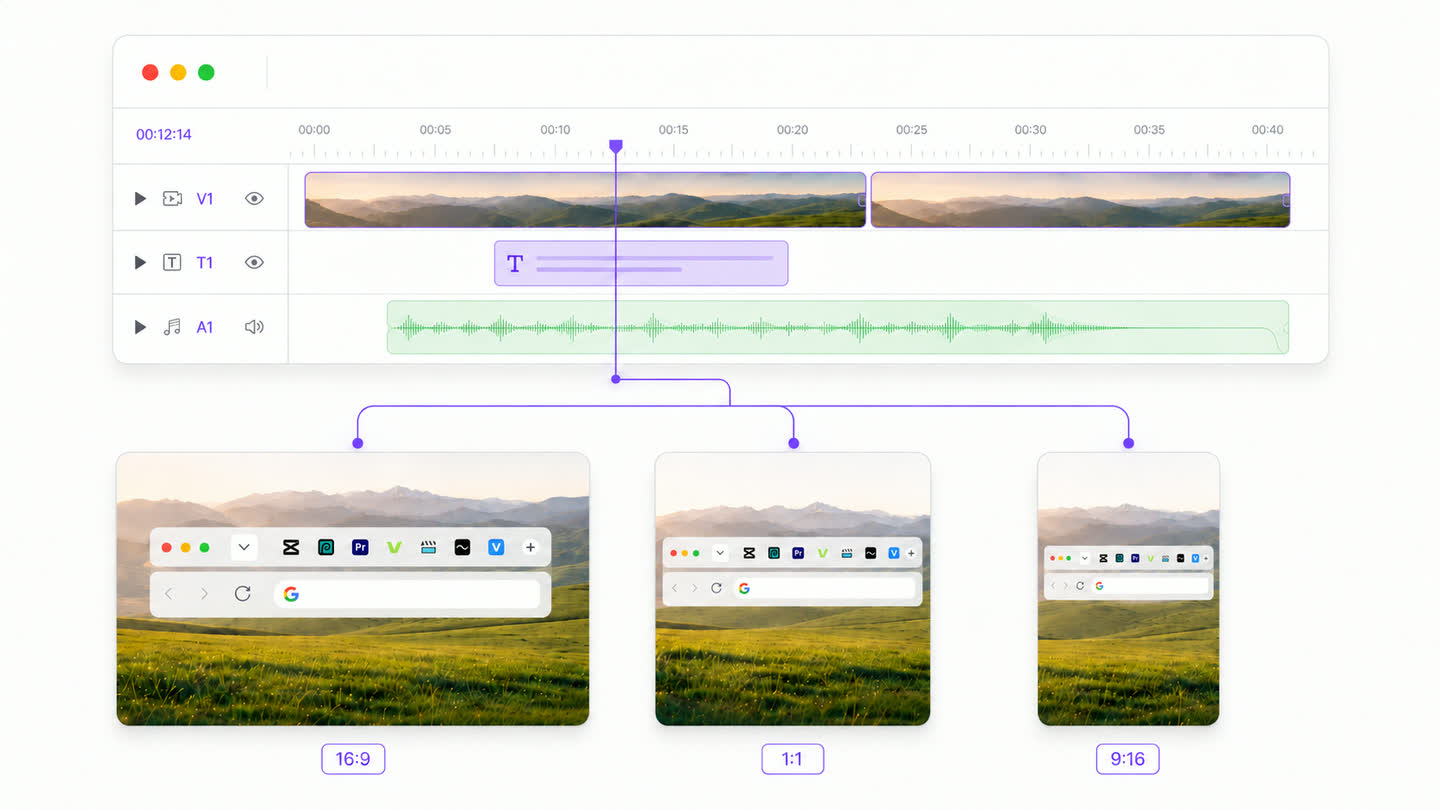
One timeline with video, title and audio tracks, branching into three exports of the same cut labelled 16:9, 1:1 and 9:16

every version, no charge

One project.
As many cuts as you need.

The square cut for the feed, the vertical one for Shorts, the version where the intro is four seconds shorter. All of them come out of the same project, and none of them costs anything, because rendering happens on your own hardware.

Download free

feature comparison

CoAnimator vs Clueso, feature by feature

CluesoCoAnimator
What each one makes
Polishing a rough takeYes.Cuts the filler words, rewrites the script, swaps in an AI voiceover, zooms to the actionPartial.Effects, titles and spotlights land on your footage by name, and the agent will cut a moment you point it at. No automatic filler-word pass over the whole take
Docs from the same recordingYes.Step-by-step guides and SOPs, exported in five formatsPartial.Articles with their images, written from the same project as the video. Not the five export formats or the SOP tooling Clueso builds around them
Animation built for youPartial.AI motion graphics, listed Basic on Free and Solo, Advanced on BusinessYes.Scenes, titles, spotlights and motion, built on templates the studio ships
What runs out
Minutes of finished videoNo.10 a month on Free, 15 on Solo, 30 on Business. Annual plans get the year’s quota upfrontYes.No minute limit. Render as long a video as you like, as often as you like
When the minutes run outNo.Exports pause until the plan renews, unless you buy an add-onYes.Nothing to run out of
AI creditsPartial.A separate monthly pool. Chat editing, avatars, motion graphics and image generation spend it; voiceover, scripts and guides do notYes.None. You bring the agent you already pay for
What it costs, and where it runs
Free tierPartial.10 minutes of video a month at 1080p, one user, no card requiredYes.The whole studio, unlimited 720p renders, forever
What it costsNo.A real free tier, then $40/mo Solo and $120/mo Business for two users, billed yearly; $50 and $150 month to monthYes.$0, or $99 once for 4K and clean exports
4KNo.Business only, from $120/mo for two users, billed yearly. Solo stops at 2K, Free at 1080pPartial.Free renders stop at 720p. 4K needs the $99 licence, then runs on your own hardware
Where the footage livesNo.Their cloud. The recording uploads before you can editYes.Your own machine. Your footage never uploads
What you own afterwardsPartial.MP4 and GIF downloads, articles in five formats, and a project inside their appYes.Scenes, media and a timeline as ordinary files on your disk

the workflow

What making a video looks like in CoAnimator

  1. 01

    Brief it

    A paragraph in plain language: what the video shows, who it’s for, the tone. No recording to make first, and nothing to upload.

  2. 02

    The agent writes the scenes

    Your agent (Claude Code, Codex, Gemini, OpenClaw, or ours) writes scenes onto the templates, pulling in your screens and assets where they belong.

  3. 03

    Narration lands timed

    The TTS plugin reads the script and places every line on the timeline where it belongs, so animation beats and voice move together.

  4. 04

    Review on the stage

    Timeline, media panel, live stage. Steer with feedback like “slow the intro” or “swap that screenshot”, and watch it hot-reload.

  5. 05

    Render locally

    In-app or headless through the coa CLI. Your machine, your disk, and no quota deciding how many versions you get to try.

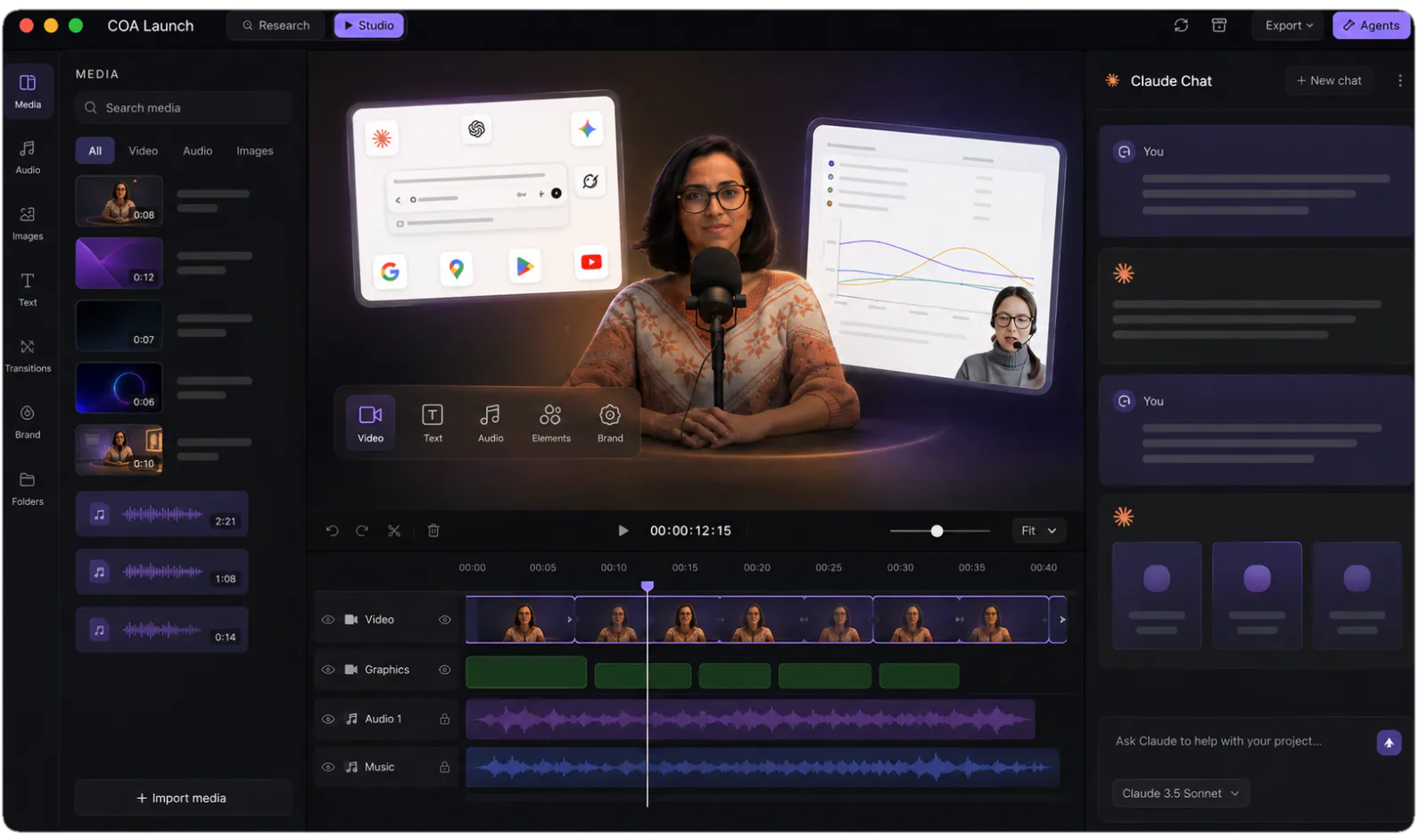
The CoAnimator studio: media library, stage and timeline with an agent chat alongside
The studio you are steering: stage, timeline and your agent, side by side.

pricing comparison

What year one looks like on each route

The Clueso route, subscribed

The polisherSolo, billed yearly. $50 month to month$40 / mo
Two seats and 4KBusiness, two users, billed yearly. $150 month to month$120 / mo
Minutes of finished video10 a month on Free, 15 on Solo, 30 on Businessmetered
Running past themExports pause until renewal, or you buy an add-onpaused
AI creditsChat edits, avatars, motion graphics, imagesmetered
How long a recording can be10 min a video on Free, 20 on Solocapped
DocumentationStep-by-step articles and SOPs in five export formatsmetered
Trying it firstA real free plan: one user, 1080p, no card10 min / mo
Year one, billed yearly$480 Solo, $1,440 Business for two, and the minutes still run out

The CoAnimator route, installed

The studioStage, timeline, media panel, agent chat, free at 720p✓ free
Two devices and 4KOne licence, extra device slots $29 once$99 once
Minutes of finished videoNo quota. How long the video runs is your callno meter
Running past themThere is nothing to run pastno cap
AI creditsYour own agent and keys, at provider priceno credits
How long a recording can beNo limit on the input or the finished filmno cap
DocumentationArticles with their images, from the same project as the videoincluded
Trying it firstFree forever, and it is the whole studio✓ free
Year one$0, or $99 once

everything included · one licence later unlocks 4K · no credits, no meters

made with coanimator

Videos shipped from the studio

Both were built end to end in CoAnimator: script, scenes, voiceover and render. Neither of them spent a minute of anyone’s quota.

MCP360: full product demo
MCP360: full product demoWatch on YouTube ↗Ten scenes, a ten-part voiceover, sound effects and a music bed. The whole 81-second demo, rendered locally.
Copilot SDK v2.5: feature demoView on X ↗
the showcaseEvery finished video, start to renderEach one with what it took to make →

FAQ

Is CoAnimator a good Clueso alternative?

For product videos, yes. For a documentation workflow, it depends how far you need it to go. Clueso is built around a recording you have already made: it cuts the filler words, rewrites the script, replaces your audio with an AI voiceover, zooms into the action, and writes a step-by-step article from the same take, exportable in five formats. CoAnimator is a desktop studio where your own coding agent builds the video from a description, using your screens and assets, renders it on your machine with no minute quota, and writes the article with its images from the same project. What Clueso still owns is the polish pass over a rough take and the SOP tooling around the article.

What does Clueso cost, and what runs out?

Read off their pricing page in August 2026: there is a free plan for one user, then Solo at $40 a month billed yearly or $50 month to month, and Business at $120 or $150 for two users. What runs out is minutes of finished video: 10 a month on Free, 15 on Solo, 30 on Business, with annual plans granted the year’s quota upfront. Their FAQ is direct about what happens next, saying exports pause until the plan renews unless you buy an add-on. AI credits are metered separately for chat editing, avatars, motion graphics and image generation, though not for voiceover, scripts or guides. CoAnimator meters none of it: the free tier renders 720p forever, and $99 once unlocks 4K.

How many videos can I actually make on Clueso?

It depends on their length, because the quota is minutes rather than videos. On Solo, fifteen minutes a month is roughly three videos of four or five minutes, or a dozen short ones. Two things soften it: re-exporting a video you already made is free, since only the longest version counts in a billing cycle, and annual plans hand you the whole year at once. CoAnimator has no quota at all, so a video you re-cut eleven times costs the same as one you get right first time.

Does CoAnimator write documentation too?

No. Clueso generates step-by-step guides and SOPs from the same recording and exports them in five formats, which is half of what that product is for, and CoAnimator has no equivalent. What CoAnimator leaves you instead is the video project itself: scenes, media and a timeline as ordinary files. When the product changes you swap the clip that went stale and re-render, and the rest comes through untouched.

Which one gives me 4K?

Clueso puts 4K on Business, from $120 a month for two users billed yearly; Solo stops at 2K and Free at 1080p. CoAnimator asks less over a year but not nothing: free renders stop at 720p, and 4K arrives with the one-off $99 licence. After that it runs on your own hardware, with no per-export fee and no cap on how many times you render.

Where does my recording go?

Clueso is a browser tool, so the recording uploads to their cloud and the editing happens there. They publish SOC 2 Type II and ISO 27001 certification and GDPR compliance, which is more than most tools this size can say. CoAnimator sidesteps the question: it is a desktop app, your footage never uploads, and rendering runs on your own machine. For an unreleased feature or a customer’s account on screen, that is often what decides it.

What does CoAnimator not have that Clueso does?

Step-by-step documentation, filler-word removal, AI avatars, voice cloning, translation into more than thirty languages, a stock media library, viewership analytics, live team collaboration, SSO, and a browser recording extension. It also runs with nothing installed. If those are the features you are shopping for, buy Clueso.

One app. Your agent runs it.

Install CoAnimator, point it at the agent you already pay for, and describe the video. Every project stays editable, renders on your own machine, and never counts against a monthly allowance.