Lifetime deal👉 DON’T MISS OUT. Limited time launch deal ends in

Alternatives · Cardboard

A Cardboard alternative for the video you haven’t filmed

Cardboard cuts footage you already shot, and it is good at it. CoAnimator is the agentic animation studio: your agent builds the video out of your screens and assets, renders it on your machine, and leaves you the project files.

macOS · Windows · Linux · no credits, no render limits

the split

What each one is

Both are driven by an agent, so the difference is what you have to bring. Cardboard cuts footage you already shot. CoAnimator builds the video when there is nothing to cut.

The editor

Cardboard

A browser editor that watches your footage, finds the moments and assembles a first cut on a multi-track timeline. Reframing, captions, dubbing and dead-air removal come with it, and the edit hands off to Premiere or Resolve.

What it needs
Footage. It uploads to their cloud before you can start.
What you get
A cut, in a project inside their app, plus an XML or Resolve handoff.
What you pay
$32/mo Creator or $120/mo Pro at monthly billing, annual advertised 20% lower. No free plan, just a 3-day trial. Usage limits on every tier, and 4K 60fps starts at Pro.

The studio

CoAnimator

The agentic animation studio. Your own agent builds narrated product videos out of your screens, your assets and your script. Demos, launches and tutorials, on a timeline you can open and change.

What it needs
A paragraph describing the video. Screen recordings if you have them.
What you get
A project of editable files on your disk, and an MP4 rendered on your machine.
What you pay
Free forever at 720p with a watermark. $99 once for 4K and clean exports. Nothing metered.

the input

What each one is handed

CardboardAn hour of recorded footage goes in. It watches the lot, keeps the moments that work, and cuts between them.
CoAnimatorA paragraph goes in. The agent writes the scenes, animates your screens, and times the narration to them.

no take required

Describe the video.
Watch it get built.

The agent builds the scenes from the material you already have, animating around your product UI, a screen recording or your brand assets. There is no hour of footage to shoot first, and no minimum of raw material for it to have something to cut.

Download free

feature comparison

CoAnimator vs Cardboard, feature by feature

CardboardCoAnimator
Where the picture comes from
What you need before you startPartial.Footage. They quote about five minutes to turn an hour of it into a finished renderYes.A paragraph. The agent builds the scenes out of your screens and assets
A shot that was never filmedPartial.Keyframes animate position, scale, opacity and blur; animated overlays are marked coming soonYes.Scenes, titles, spotlights and motion, built on templates the studio ships
What the editor does
Finding a moment in hours of footageYes.Searches your footage by quote, reaction, person, emotion or scenePartial.No search over a recorded take. The shot is built or generated to the brief instead, so there are rarely hours of footage to hunt through
Cutting the dead airYes.Strips the ums, ahs, pauses and silences out of a takeYes.The agent cuts the pauses and retakes you point it at, and closes the timeline around them
Reframing and captionsYes.Active reframe and animated captions on the $32 plan, alongside translation, dubbing and voice cloningYes.Captions and any aspect ratio you ask for, written into the scenes from your script
What it costs, and where it runs
Free tierNo.No free plan. First-time subscribers get a 3-day trialYes.Free forever: the whole studio, unlimited 720p renders with a watermark
What it costsNo.$32/mo Creator, $120/mo Pro at monthly billing, Teams custom. Annual is advertised at 20% lessYes.$0, or $99 once for 4K and clean exports
Usage limitsNo.Usage limits on every plan: base on Creator, 6Ă— on Pro, custom on Teams. Extra credits start at $10, with bulk discounts to 30%Yes.None. Renders are never metered
4KPartial.4K 60fps from Pro, $120/mo. The $32 Creator plan is dashed out of that rowPartial.Free renders top out at 720p. 4K needs the $99 licence, then runs on your own hardware
Where the footage livesNo.Their cloud holds the project. Footage uploads before you can start, capped at 2 GB a file on CreatorYes.Your own machine and your own disk. Your footage never uploads

the workflow

What making a video looks like in CoAnimator

  1. 01

    Brief it

    A paragraph in plain language: what the video shows, who it’s for, the tone. There is no footage to upload first.

  2. 02

    The agent writes the scenes

    Your agent (Claude Code, Codex, Gemini, OpenClaw, or ours) writes scenes onto the templates, pulling in your screens and assets where they belong.

  3. 03

    Narration lands timed

    The TTS plugin reads the script and places every line on the timeline where it belongs, so animation beats and voice move together.

  4. 04

    Review on the stage

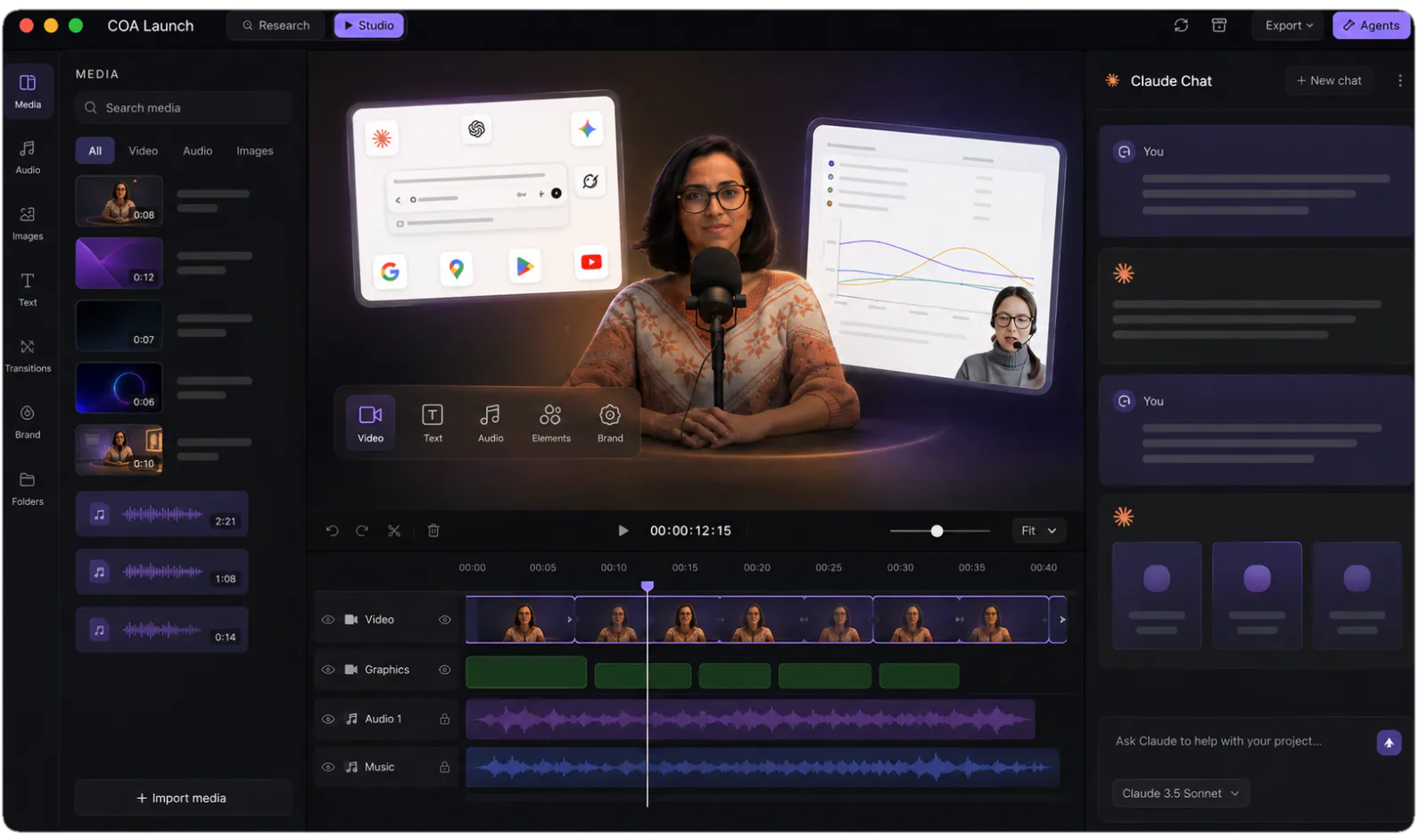
    Timeline, media panel, live stage. Steer with feedback like “slow the intro” or “swap that screenshot”, and watch it hot-reload.

  5. 05

    Render locally

    In-app or headless through the coa CLI. Your machine, your disk, unlimited renders, and your footage never leaves it.

The CoAnimator studio: media library, stage and timeline with an agent chat alongside
The studio you are steering: stage, timeline and your agent, side by side.

pricing comparison

What year one looks like on each route

The Cardboard route, subscribed

The editorCreator: base usage, 2 GB a file, 50 GB storage$32 / mo
6Ă— the usagePro: 10 GB a file, 250 GB storage, faster exports$120 / mo
4K 60fpsDashed out of Creator. Starts at the Pro tier$120 / mo
Stock video and B-rollListed on the Teams plan onlyask them
Usage limitsBase on Creator, 6Ă— on Pro, custom on Teamsmetered
Running out mid-editExtra credits, bulk discounts up to 30%from $10
Trying it first3-day trial for first-time subscribersno free plan
Your footageUploads to their cloud before you can startrequired
Year one, at monthly billing$384–1,440 a seat, before credits

The CoAnimator route, installed

The studioStage, timeline, media panel, agent chat, free at 720pâś“ free
Clean 1080p and 2KIncluded with the one-off licencepay once
4K 60fps$99 once, rendered on your own hardwarepay once
Stock video and B-rollNone. Templates ship looks, not cataloguesnot ours
Usage limitsRender as long a video as you like, as often as you likeno meter
Running out mid-editNothing to run out of, so nothing to top upno credits
Trying it firstFree forever, not for three daysâś“ free
Your footageNever uploaded. It stays on your own disklocal
Year one$0, or $99 once

everything included · one licence later unlocks 4K · no credits, no meters

made with coanimator

Videos shipped from the studio

Neither of these started as footage. Both were briefed, built and rendered in CoAnimator: script, scenes, voiceover and export.

MCP360: full product demo
MCP360: full product demoWatch on YouTube ↗Ten scenes, a ten-part voiceover, sound effects and a music bed. The whole 81-second demo, rendered locally.
Copilot SDK v2.5: feature demoView on X ↗
the showcaseEvery finished video, start to renderEach one with what it took to make →

FAQ

Is CoAnimator a good Cardboard alternative?

Only when the footage does not exist yet. Cardboard is an agentic editor. You upload what you shot, and it watches the footage, finds the moments, cuts it together, reframes it for vertical, strips the dead air and captions it. For an hour of recorded video that needs to become a two-minute cut, it is built for that and CoAnimator is not. CoAnimator is a desktop studio where your own coding agent builds the video from scratch, putting scenes, titles, motion and narration over your product UI and screen recordings, then rendering it on your machine.

What does Cardboard cost, and what runs out?

Read off their pricing page in August 2026: Creator is $32 a month and Pro is $120 a month at monthly billing, with Teams custom-priced; the page offers annual billing at 20% less but does not print the figure. There is no free plan, only a 3-day trial for first-time subscribers. Every plan carries built-in usage limits, base on Creator, 6Ă— that on Pro and custom on Teams, and running past them means buying credits, which start at $10 with bulk discounts up to 30%. Creator also caps ingestion at 2 GB a file with 50 GB of storage, and is dashed out of the 4K 60fps row; Pro raises that to 10 GB and 250 GB and is where 4K starts. CoAnimator has no meters at all: the free tier renders 720p forever, and $99 once unlocks 4K and clean exports.

Do I need footage to use CoAnimator?

No. You brief the agent in a paragraph, saying what the video shows, who it is for and the tone, and it writes scenes onto the templates the studio ships, using your product UI, your assets and your brand. Screen recordings go in when you have them, and the agent animates around them with titles, spotlights and motion. Cardboard needs a take to cut; CoAnimator needs a description.

Which one gives me 4K?

Both, but each puts it behind a different kind of gate. Cardboard’s feature matrix dashes 4K 60fps out of the $32 Creator plan and ticks it on Pro and Teams, so reaching 4K there means $120 a month for as long as you want to keep exporting at it. In CoAnimator free renders stop at 720p and 4K arrives with the one-off $99 licence. After that it runs on your own hardware, with no per-export fee and no cap on how many times you render.

What does CoAnimator not have that Cardboard does?

Footage search across hours of video, transcript-driven silence removal, automatic reframing that keeps the subject in shot, dubbing and voice cloning, share links with comments pinned to exact timecodes, and an XML handoff to Premiere Pro or DaVinci Resolve. It also runs entirely in a browser with nothing to install. If those are the features you are shopping for, buy Cardboard.

Where does my footage go?

In Cardboard it uploads to their cloud, which is where the project lives, and you cannot start until it is there. The export itself runs on your own hardware now, in the browser, but the footage has already made the trip. CoAnimator is a desktop app, so your screen recordings, assets and renders stay on your own disk and your footage is never uploaded. If the footage shows an unreleased feature or a customer’s account, that is often what decides it.

What happens to the video after it is made?

In CoAnimator the video stays a project of ordinary files: scenes, media and a timeline. When the product changes you swap the clip that went stale and re-render, and the rest comes through untouched. Rendering is one command through the coa CLI, so a release script can re-render every video you own. Because it is files, the whole project lives in git alongside the code it documents.

Make the whole video before you pay anything

Every template, every look and unlimited local renders at 720p, for as long as you like rather than for three days. Nothing is metered, and your footage never uploads.