Antigravity CLI
Drive CoAnimator with Google's Antigravity CLI in a built-in terminal tab.
CoAnimator 0.7.2 offers Antigravity as its Google terminal-agent option. The
command is agy. Legacy Gemini sessions are separate from this setup and Gemini
is hidden from new-agent selection.
Unlike the other agents, Antigravity opens as a terminal tab rather than a CoAnimator chat tab, so you get its own interface, sign-in, and model picker rather than a wrapper around them.
Set it up
Install the CLI
curl -fsSL https://antigravity.google/cli/install.sh | bashOn Windows, irm https://antigravity.google/cli/install.ps1 | iex. The binary
is agy, not gemini or antigravity.
Sign in
Run agy once and complete Google's sign-in.
Open it in a terminal tab
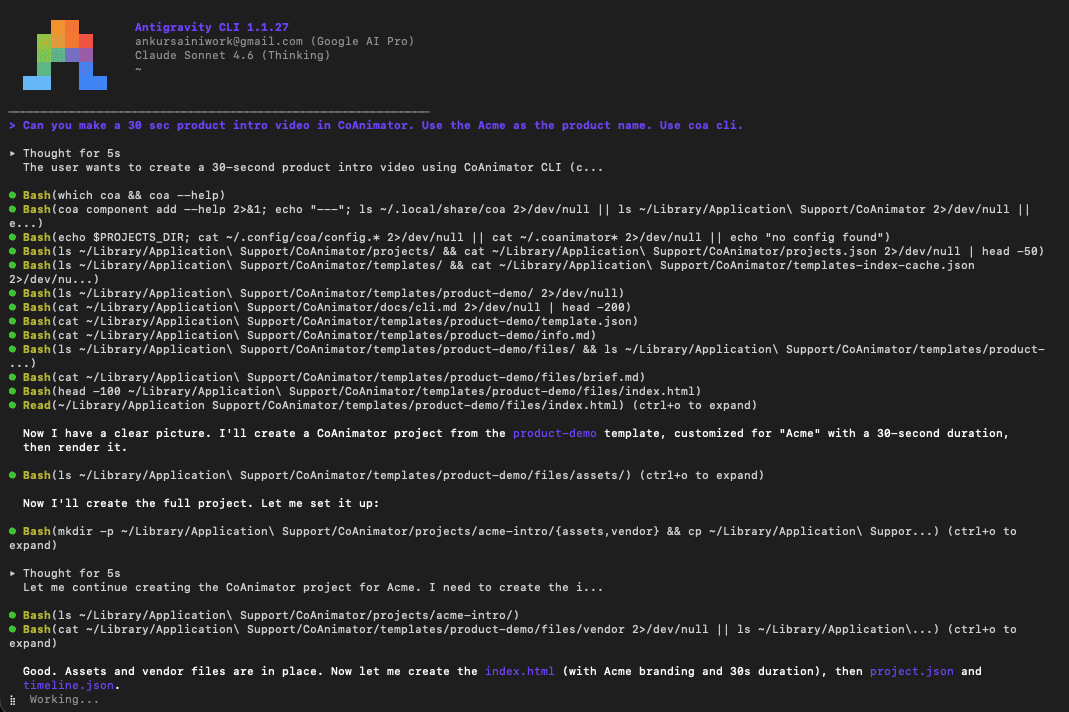
Pick Antigravity in the agent picker and CoAnimator opens it as a terminal tab in your project directory. You get Antigravity's own interface, its own approvals, and its own history. CoAnimator supplies the working directory and the window, not the agent loop.
Ask for a video
Ask for the video you want. The agent reads the app's bundled docs and
templates, scaffolds the project on disk, and renders it with the
coa CLI. The project is ordinary files, so no API is involved.
To teach it the CLI up front, give it the coa skill: put
SKILL.md in a coa-cli/ folder inside that
agent's own skills directory.
Approvals happen inside Antigravity's own interface, not CoAnimator's. The app's permission prompts and change receipts apply to chat agents, not to terminal tabs.